
Nissan Rogue Owners Manual: Around View® Monitor (if so equipped)
With the ignition switch in the ON position, press the CAMERA button or move the shift lever to the R (Reverse) position to operate the Around View Monitor. The monitor displays various views of the position of the vehicle in a split screen format.
WARNING
|
Available views:
- Bird’s-Eye View
The surrounding view of the vehicle from above. - Front-Side View
The view around and ahead of the front passenger’s side wheel. - Front View
The view to the front of the vehicle. - Rear View
The view to the rear of the vehicle.
The system is designed as an aid to the driver in situations such as slot parking or parallel parking.
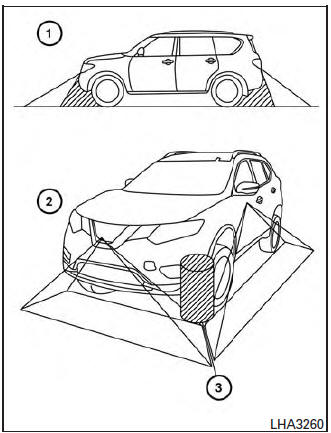
There are some areas where the system will not show objects. When in the front or rearview display, an object below the bumper or on the ground may not be viewed 1 . When in the bird’s-eye view, a tall object near the seam of the camera viewing areas will not appear in the monitor 2 .
| CAUTION Do not scratch the camera lens when cleaning dirt or snow from the front of the camera. |
- Available views
- Difference between predictive and actual distances
- How to switch the display
- Moving Object Detection (MOD) (if so equipped)
- Operating tips
 Difference between predicted and actual
distances
Difference between predicted and actual
distances
Backing up on a steep uphill
When backing up the vehicle up a hill, the distance
guide lines and the vehicle width guide
lines are shown closer than the actual distance.
For example, the dis ...
 Available views
WARNING
The distance guide line and the vehicle
width line should be used as a reference
only when the vehicle is on a paved,
level surface. The distance viewed on
the ...
Other materials:
P0127 IAT sensor
DTC Description
DTC DETECTION LOGIC
DTC No.
CONSULT screen terms
(Trouble diagnosis content)
DTC detecting condition
P0127
IAT SENSOR-B1
(Intake air temperature too high)
Rationally incorrect voltage from the sensor is sent to ECM,
compared with
the voltage ...
P2815 select solenoid
DTC Description
DTC DETECTION LOGIC
DTC
CONSULT screen terms
(Trouble diagnosis content)
DTC detection condition
P2815
SELECT SOLENOID
(Select solenoid)
When all of the following conditions are satisfied and this state is
maintained
for 0.2 seconds:
&nb ...
Preparation
Special Service Tools
The actual shape of the tools may differ from those illustrated here.
Tool number
(Kent-Moore No.)
Tool name
Description
(J-44321)
Fuel pressure gauge
kit
Checks fuel pressure
KV10120000
Fuel tube adapter
...
