
Nissan Rogue Owners Manual: Moving Object Detection (MOD) (if so equipped)
The MOD system can inform the driver of moving objects behind the vehicle when backing out of garages, maneuvering in parking lots and in other such instances.
The MOD system detects moving objects by using image processing technology on the image shown in the display.
The MOD system operates in the following conditions when the camera view is displayed:
- When the shift lever is in the P (Park) or N (Neutral) position and the vehicle is stopped, theMODsystem detects the moving objects in the bird’s-eye view. The MOD system will not operate if the outside mirror is moving in or out or if either door is opened.
- When the shift lever is in the D (Drive) position and the vehicle speed is below approximately 5 mph (8 km/h), the MOD system detects moving objects in the front view or front-wide view.
- When the shift lever is in the R (Reverse)
position and the vehicle speed is below approximately
5 mph (8 km/h), the MOD system
detects moving objects in the rear view.
The MOD system will not operate if the liftgate is open.
The MOD system does not detect moving objects in the front-side view. TheMODsystem icon is not displayed on the screen when in this view.
WARNING
|
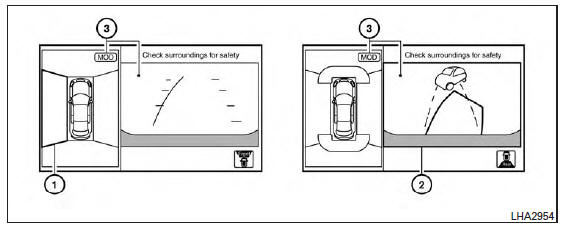
If the MOD system detects the moving objects surrounding the vehicle, the yellow frame will be displayed on the camera image and a chime sounds.
When the MOD system detects a moving object surrounding the vehicle, the yellow frame will be displayed on the view where the objects are detected and a chime will sound once. While the MOD system continues to detect moving objects, the yellow frame continues to be displayed.
In the bird’s-eye view, the yellow 1 is displayed on each camera image (front, rear, right, left) depending on where moving objects are detected.
The yellow frame 2 is displayed on each view in the front view, rear view modes.
A blue MOD icon is displayed in the view where theMODsystem is operative. A grayMODicon is displayed in the view where the MOD system is not operative.
If theMODsystem is turned off, theMODicon 3 is not displayed.
Turning the MOD system on or off
The MOD system is turned on or off using the settings menu in the vehicle information display.
A blue MOD icon is displayed if the MOD is operative.
A gray MOD icon is displayed if the MOD is not operative.
- Press the
 button
until “Settings� displays
in the vehicle information display. Use
the
button
until “Settings� displays
in the vehicle information display. Use
the  to select “Driver
Assistance�.
to select “Driver
Assistance�.Then press the ENTER button.
- Select “Parking Aids�, and press the ENTER button.
- To set the MOD system to on or off, use
the
 buttons to navigate in the
menu
and use the ENTER button to select or
change an item:
buttons to navigate in the
menu
and use the ENTER button to select or
change an item:
- To turn off the warning, use the ENTER button to check box for “Moving Object� If the MOD system is turned off, the MOD icon is not displayed.
Moving Object Detection (MOD) malfunction
WARNING
|
When the orange MOD icon is displayed in the view, the system is not functioning properly. This will not hinder normal driving operation but the system should be inspected by a NISSAN dealer.
Camera Maintenance
If dirt, rain or snow accumulates on the camera, theMODsystem may not operate properly. Clean the camera.
 How to switch the display
With the ignition switch in the ON position, press
the CAMERA button or move the shift lever to the
R (Reverse) position to operate the Around View
Monitor.
The Around View Monitor displays diff ...
 Operating tips
CAUTION
Do not use alcohol, benzine or thinner
to clean the camera. This will cause
discoloration. To clean the camera,
wipe with a cloth dampened with a diluted
mild ...
Other materials:
CVT position
Inspection
Turn ON the ignition switch with the shift selector at the “P� position.
Press the shift selector button with the brake pedal depressed,
and confirm that the shift selector can be
moved to positions other than “P�. Also confirm that movement is not allowed
from ...
Wiring diagram
POWER DOOR LOCK SYSTEM
Wiring Diagram
REMOTE KEYLESS ENTRY SYSTEM
Wiring Diagram
...
S connector circuit
Description
The starter motor magnetic switch is supplied with power when the ignition
switch is turned to the START position
while the selector lever is in the P (Park) or N (Neutral) position.
Diagnosis Procedure
Regarding Wiring Diagram information, refer to STR-7, "Wiring Diagram" ...
