
Nissan Rogue Owners Manual: Difference between predicted and actual distances
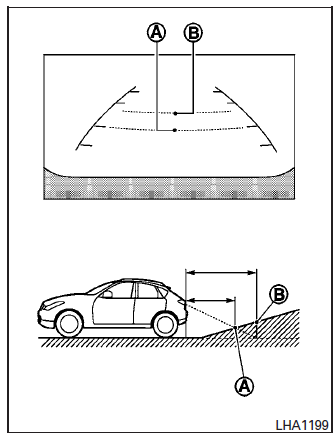
Backing up on a steep uphill
When backing up the vehicle up a hill, the distance guide lines and the vehicle width guide lines are shown closer than the actual distance.
For example, the display shows 3 ft (1.0 m) to the place A , but the actual 3 ft (1.0 m) distance on the hill is the place B . Note that any object on the hill is further than it appears on the monitor.
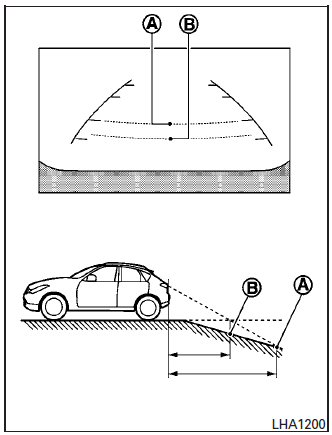
Backing up on a steep downhill
When backing up the vehicle down a hill, the distance guide lines and the vehicle width guide lines are shown farther than the actual distance.
For example, the display shows 3 ft (1.0 m) to the place A , but the actual 3 ft (1.0 m) distance on the hill is the place B . Note that any object on the hill is closer than it appears on the monitor.
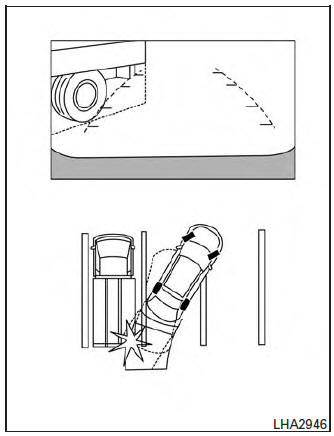
Backing up near a projecting object
The vehicle may seem to nearly clear the object in the display. However, the vehicle may hit the object if it projects over the actual backing up course.
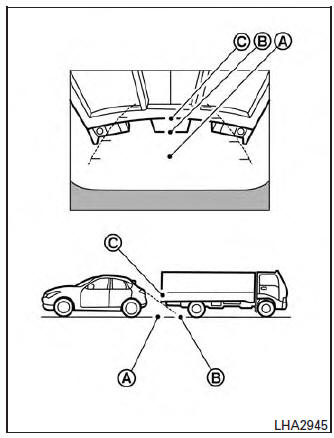
Backing up behind a projecting object
The position C is shown farther than the position B in the display. However, the position C is actually at the same distance as the position A .
The vehicle may hit the object when backing up to the position A if the object projects over the actual backing up course.
OPERATING TIPS
- When the shift lever is shifted to the R (Reverse) position, the monitor screen automatically changes to the RearView Monitor mode. However, the radio can be heard.
- When the view is switched, the display images on the screen may be displayed with some delay.
- When the temperature is extremely high or
low, the screen may not clearly display objects.
This is not a malfunction.
- When strong light is directly coming on the camera, objects may not be displayed clearly. This is not a malfunction.
- Vertical lines may be seen in objects on the screen. This is due to strong reflected light from the bumper. This is not a malfunction.
- The screen may flicker under fluorescent light. This is not a malfunction.
- The colors of objects on the RearView Monitor may differ somewhat from the actual color of objects. This is not a malfunction.
- Objects on the monitor may not be clear in a dark environment. This is not a malfunction.
- If dirt, rain or snow accumulates on the camera, the RearView Monitor may not display object clearly. Clean the camera.
- Do not use alcohol, benzine or thinner to
clean the camera. This will cause discoloration.
To clean the camera, wipe with a cloth dampened with diluted mild cleaning agent and then wipe with a dry cloth.
- Do not damage the camera as the monitor screen may be adversely affected.
- Do not use wax on the camera window.
Wipe off any wax with a clean cloth dampened with mild detergent diluted with water.
 Adjusting the screen
The procedure for adjusting the quality of the
screen differs depending on the type of screen
present on the vehicle.
For vehicles without Navigation System:
Press the ENTER/SETTING ...
 Around View® Monitor (if so equipped)
With the ignition switch in the ON position, press
the CAMERA button or move the shift lever to the
R (Reverse) position to operate the Around View
Monitor. The monitor displays various views of
t ...
Other materials:
Precautions on SRS
This SRS section contains important information
concerning the following systems:
Driver and passenger supplemental frontimpact
air bag (NISSAN Advanced Air Bag
System)
Front seat-mounted side-impact supplemental
air bag
Roof-mounted curtain side-impact and rollover
supp ...
Periodic maintenance
FUEL SYSTEM
Inspection
Inspect fuel lines, fuel filler cap, and fuel tank for improper attachment,
leaks, cracks, damage, loose connections, chafing or deterioration.
(A) : Engine
(B) : Fuel line
(C) : Fuel tank
If necessary, repair or replace damaged parts.
Quick Connector
CAUTION:
...
Service data and specifications (SDS)
Wheel Alignment (Unladen*1)
*1: Fuel, engine coolant, and lubricants are full. Spare tire, jack, hand
tools, and mats are in designated positions.
Ball Joint
Wheelarch Height (Unladen*)
*: Fuel, engine coolant, and lubricants are full. Spare tire, jack, hand
tools, and mats are i ...
