
Nissan Rogue Service Manual: Battery
Exploded View
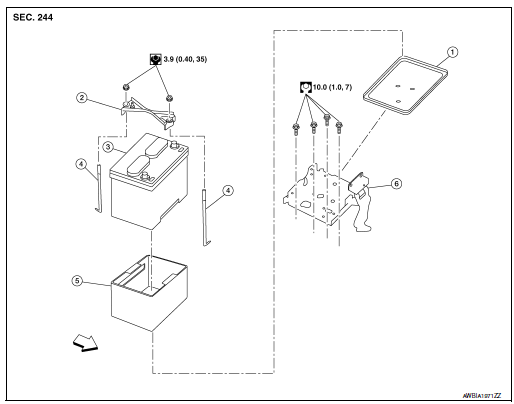
- Battery tray liner
- Battery frame
- Battery
- Battery rod
- Battery cover
- Battery tray
 Front
Front
Removal and Installation (Battery)
REMOVAL
- Pull back cover of battery positive terminal.
- Loosen the battery terminal nuts and disconnect the battery
negative and positive terminals.
CAUTION: To prevent damage to the parts, disconnect the battery negative terminal first.
- Remove battery frame nuts, battery frame and battery rods.
- Remove battery cover and battery.
INSTALLATION
Installation is in the reverse order of removal.
CAUTION:
- Make sure battery tray liner is clean prior to installing new battery.
- To prevent damage to the parts, connect the battery positive terminal first.
- Make sure battery cables are tightly clamped to battery terminals for good contact.
- Check battery terminal for poor connection caused by corrosion.
WARNING: Do not allow battery fluid to come into contact with skin, eyes, fabrics, or painted surfaces. After touching a battery, never touch or rub your eyes until you have thoroughly washed your hands. If acid contacts eyes, skin or clothing, immediately flush with water for 15 minutes and seek medical attention.
Failure to do this may cause personal injury or damage to clothing or the painted surfaces.
Battery terminal nut : 5.0 N·m (0.51 kg-m, 44 in-lb)
Reset electronic systems as necessary. Refer to .PG-72, "ADDITIONAL SERVICE WHEN REMOVING BATTERY NEGATIVE TERMINAL : Special Repair Requirement"
Removal and Installation (Battery Tray)
REMOVAL
- Remove battery. Refer to PG-75, "Removal and Installation (Battery)".
- Remove air cleaner and air duct. Refer to EM-24, "Removal and Installation".
- Disconnect harness connector from TCM.
- Remove wiring harness retainers.
- Disconnect harness connectors from ECM.
- Remove battery tray. Refer to PG-75, "Exploded View"
- Remove TCM bracket from battery tray (if necessary).
- Remove ECM bracket from battery tray (if necessary).
INSTALLATION
Installation is in the reverse order of removal.
Reset electronic systems as necessary. Refer to PG-72, "ADDITIONAL SERVICE WHEN REMOVING BATTERY NEGATIVE TERMINAL : Special Repair Requirement".

 Battery terminal with fusible link
Exploded View
Cover
Fusible link box (battery)
Positive cable
Battery
Harness connector
Front
Removal and Installation
REMOVAL
Loosen battery terminal n ...
Other materials:
Preparation
Special Service Tool
The actual shape of the tools may differ from those illustrated here.
Tool number
(TechMate No.)
Tool name
Description
—
(J-46534)
Trim Tool Set
Removing trim components
...
Key interlock cable
Exploded View
Key cylinder
Clip
Key interlock cable
Shift selector assembly
Removal and Installation
REMOVAL
CAUTION:
Always apply the parking brake before performing removal and installation.
Move shift selector to the “N� position.
Remo ...
C1155 brake fluid level switch
DTC Logic
DTC DETECTION LOGIC
DTC
Display Item
Malfunction detected condition
Possible causes
C1155
BR FLUID LEVEL LOW
When brake fluid level low signal is detected
Harness or connector
ABS actuator and electric unit
(control unit)
...
