
Nissan Rogue Service Manual: Symptom diagnosis
COMBINATION SWITCH SYSTEM SYMPTOMS
Symptom Table
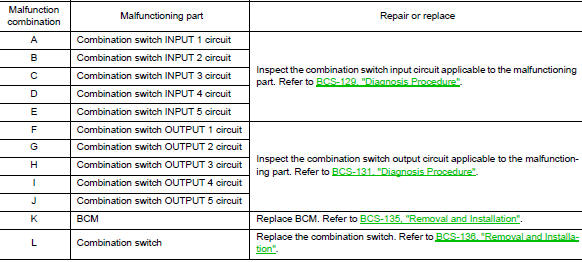
- Perform the data monitor of CONSULT to check for any malfunctioning item.
- Check the malfunction combinations.

- Identify the malfunctioning part from the agreed combination and repair or replace the part.
NORMAL OPERATING CONDITION
Description
SHIPPING MODE
- Shipping mode inhibits battery power consumption during transportation or storage of the vehicle. Vehicle is set to shipping mode before being shipped from the factory.
- When ignition switch is OFF, BCM operates shipping mode.
- BCM control function is limited in shipping mode. Remote keyless entry function is not operated during the shipping mode.
- For shipping mode cancel operation, refer to BCS-123, "Work Procedure".
NOTE: Do not cancel shipping mode during storage of the vehicle. Always cancel shipping mode before delivery of the vehicle to customer.
 DTC/circuit diagnosis
U1000 CAN COMM CIRCUIT
Description
Refer to LAN-8, "System Description".
DTC Logic
DTC DETECTION LOGIC
NOTE:
U1000 can be set if a module harness was disconnected and reconnected, perh ...
 Removal and installation
BCM (BODY CONTROL MODULE)
Removal and Installation
CAUTION:
Before replacing the BCM, perform “READ CONFIGURATION� to save or print current
vehicle specification.
Refer to BCS-120, "A ...
Other materials:
Parking brake system
Inspection and Adjustment
INSPECTION
Pedal Stroke
Operate the parking brake pedal with a force of 196 N (20.0 kg-f,
44.1 lb-f). Check that the pedal stroke is
within the specified number of notches. (Check it by listening to the clicks
of the ratchet.)
Number of notches : Refe ...
Divide-n-hide® adjustable floor (if so equipped)
Divide-n-hide® adjustable floor (if so equipped)
WARNINGDo not put objects heavier than 165 lbs
(75 kg) on the Divide-N-Hide® while in the
mid position. In the upper position, objects
should not weigh more than 30 lbs
(14 kg).
There are multiple positions for the adju ...
Refrigerant pressure sensor
Component Function Check
1.CHECK REFRIGERANT PRESSURE SENSOR FUNCTION
Start engine and warm it up to normal operating temperature.
Turn A/C switch and blower fan switch ON.
Check the voltage between ECM harness connector terminals under
the following conditions.
...
