
Nissan Rogue Owners Manual: Bluetooth® Hands-Free Phone System without Navigation System (if so equipped)
WARNING
|
| CAUTION To avoid discharging the vehicle battery, use a phone after starting the engine. |
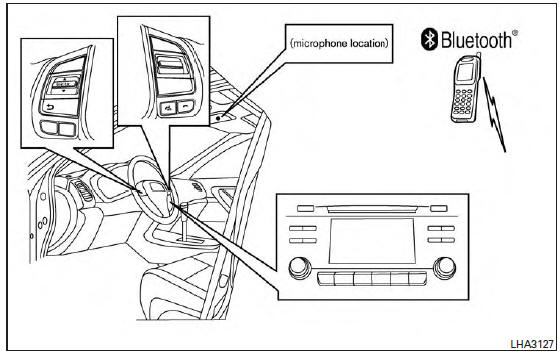
Your NISSAN is equipped with the Bluetooth® Hands-Free Phone System. If you have a compatible Bluetooth® enabled cellular phone, you can set up the wireless connection between your cellular phone and the in-vehicle phone module.
With Bluetooth® wireless technology, you can make or receive a hands-free telephone call with your cellular phone in the vehicle.
Once your cellular phone is connected to the in-vehicle phone module, no other phone connecting procedure is required. Your phone is automatically connected with the in-vehi phone module when the ignition switch is placed in the ON position with the previously connected cellular phone turned on and carried in the vehicle.
NOTE: Some devices require the user to accept connections to other Bluetooth® devices. If your phone does not connect automatic ally to the system, consult the phone’s Owner’s Manual for details on device operation. You can connect up to five different Bluetooth® cellular phones to the in-vehicle phone module.
However, you can talk on only one cellular phone at a time.
Before using the Bluetooth® Hands-Free Phone System, refer to the following notes.
- Set up the wireless connection between a compatible cellular phone and the in-vehicle phone module before using the hands-free phone system.
- Some Bluetooth® enabled cellular phones
may not be recognized or work properly.
Please visit www.nissanusa.com/bluetooth for a recommended phone list and connecting instructions.
- You will not be able to use a hands-free phone under the following conditions:
- Your vehicle is outside of the cellular service area.
- Your vehicle is in an area where it is difficult to receive a cellular signal; such as in a tunnel, in an underground parking garage, near a tall building or in a mountainous area.
- Your cellular phone is locked to prevent it from being dialed.
- When the radio wave condition is not ideal or ambient sound is too loud, it may be difficult to hear the other person’s voice during a call.
- Do not place the cellular phone in an area surrounded by metal or far away from the in-vehicle phone module to prevent tone quality degradation and wireless connection disruption.
- While a cellular phone is connected through the Bluetooth® wireless connection, the battery power of the cellular phone may discharge quicker than usual. The Bluetooth® Hands-Free Phone System cannot charge cellular phones.
- If the hands-free phone system seems to be malfunctioning, refer to “Troubleshooting guide� in this section. You can also visit www.nissanusa.com/bluetooth for troubleshooting help.
- Some cellular phones or other devices may cause interference or a buzzing noise to come from the audio system speakers. Storing the device in a different location may reduce or eliminate the noise.
- Refer to the cellular phone Owner’s Manual regarding the telephone charges, cellular phone antenna and body, etc.
- Regulatory Information
- Using the system
- Control buttons
- Connecting procedure
- Voice commands
- Making a call
- Text messaging
- Manual control
 Car phone or CB radio
When installing a CB, ham radio or car phone in
your vehicle, be sure to observe the following
precautions; otherwise, the new equipment may
adversely affect the engine control system and
other el ...
 Regulatory Information
FCC Regulatory information
CAUTION: To maintain compliance with
FCC’s RF exposure guidelines, use only the
supplied antenna. Unauthorized antenna,
modification, or attachments could ...
Other materials:
P0335 CKP sensor (POS)
DTC Description
DTC DETECTION LOGIC
DTC No.
CONSULT screen terms
(Trouble diagnosis content)
DTC detecting conditio
P0335
CKP SEN/CIRCUIT
(Crankshaft position sensor ″A″ circuit)
The crankshaft position sensor (POS) signal is not detected by
...
Diagnosis system (combination meter)
Description
COMBINATION METER SELF-DIAGNOSIS MODE
The following meter functions can be checked during Combination Meter
Self-Diagnosis Mode:
Pointer sweep of speedometer, tachometer and gauges.
Illumination of all LCD segments and color patterns for meter
displays.
I ...
P2014, P2016, P2017, P2018 intake manifold runner control
valve position sensor
DTC Description
DTC DETECTION LOGIC
DTC No.
CONSULT screen terms
(Trouble diagnosis content)
DTC detecting condition
P2014
IN/MANIFOLD RUNNER POS SEN B1
(Intake manifold runner position sensor/
switch circuit bank 1)
An excessively low voltage from the sensor i ...
