
Nissan Rogue Owners Manual: Control buttons
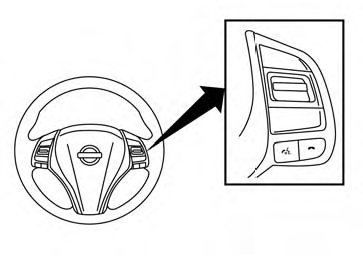
Control buttons
The control buttons for the Bluetooth® Hands- Free Phone System are located on the steering wheel.
 PHONE/SEND
Press the button to
initiate
a Voice Recognition session or
answer an incoming call.
button to
initiate
a Voice Recognition session or
answer an incoming call.
You can also use the  button
to interrupt the system feedback
and give a command at once. For
additional information, refer to
“Voice Commands� and “During a
call� in this section
button
to interrupt the system feedback
and give a command at once. For
additional information, refer to
“Voice Commands� and “During a
call� in this section
 PHONE/END
While the voice recognition system
is active, press and hold
the  button for 5 seconds to
quit the voice recognition system
at any time.
button for 5 seconds to
quit the voice recognition system
at any time.
 Tuning
switch
Tuning
switch
While using the voice recognition system, tilt the tuning switch up or down to manually control the phone syste
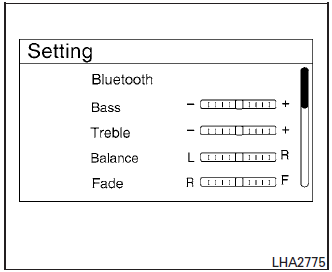
 Using the system
The NISSAN Voice Recognition system allows
hands-free operation of the Bluetooth® Hands-
Free Phone System.
If the vehicle is in motion, some commands may
not be available so full attention may ...
 Connecting procedure
NOTE:
The connecting procedure must be performed
when the vehicle is stationary. If the
vehicle starts moving during the procedure,
the procedure will be cancelled.
To connect a phone to the Blue ...
Other materials:
P2101 electric throttle control function
DTC Description
DTC DETECTION LOGIC
DTC No.
CONSULT screen terms
(Trouble diagnosis content)
DTC detecting condition
P2101
ETC FNCTN/CIRC-B1
(Throttle actuator ″A″ control motor circuit
range/performance)
Electric throttle control function does not ...
Fuel tank
FWD
FWD : Exploded View
Fuel filler cap
Grommet
Fuel filler tube
Cover
Clamp
Fuel filler hose
Clamp
Vent hose
Fuel tank protector
Fuel tank strap (LH)
Fuel tank strap (RH)
Fuel tank
T ...
Combination meter
Reference Value
VALUES ON THE DIAGNOSIS TOOL
*: DDS (hill descent control)
NOTE:
Some items are not available according to vehicle specification.
TERMINAL LAYOUT
PHYSICAL VALUES
Fail-safe
The combination meter activates the fail-safe control if the CAN
communica ...
