
Nissan Rogue Service Manual: Removal and installation
GENERATOR
Exploded View
REMOVAL
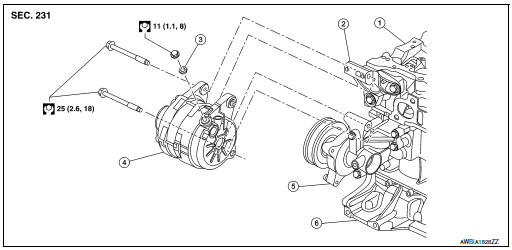
- Cylinder head
- Generator bracket
- Washer
- Generator
- Water pump
- Cylinder block
Removal and Installation
REMOVAL
- Disconnect negative terminal from battery. Refer to PG-75, "Exploded View".
- Remove wheel and tire (RH) using a power tool. Refer to WT-60, "Removal and Installation".
- Remove fender protector side cover. Refer to EXT-28, "FENDER PROTECTOR : Exploded View"
- Remove front air spoiler. Refer to EXT-16, "Exploded View".
- Remove engine under cover. Refer to EXT-37, "ENGINE UNDER COVER : Removal and Installation".
- Remove drive belt. Refer to EM-13, "Removal and Installation".
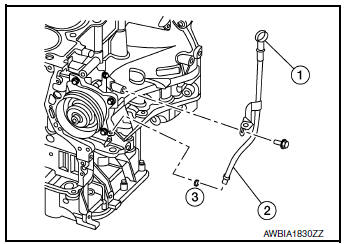
- Remove oil level gauge (1).
- Remove oil level gauge guide (2).
- Remove oil level gauge guide O-ring (3).
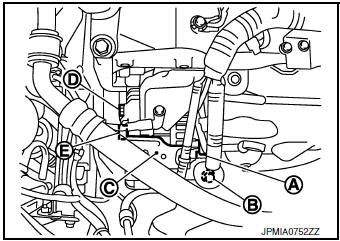
- Disconnect generator connector (A).
- Remove “B� terminal nut (B) and “B� terminal harness.
- Remove harness bracket (C).
NOTE: Harness ground does not have to be removed during bracket removal.
- Remove upper generator mounting bolt (D), using suitable tool.
- Remove lower generator mounting bolt (E), using suitable tool.
- Remove generator upward from the vehicle.
INSTALLATION
Installation is in the reverse order of removal.
- Tighten oil level gauge guide bolt to specification.
Oil level gauge guide bolt : 21.6 N·m (2.2 kg-m, 16 ft-lb)
CAUTION:
- Be careful to tighten “B� terminal nut carefully.
- Install generator and check tension of belt. Refer to EM-13, "Checking".
- Do not reuse oil level gauge guide O-ring.
- Prior to installation, apply clean engine oil to oil level gauge guide O-ring.
- Ensure O-ring sealing surface is free from dust or imprefections.
- Allow engine to run for 5 minutes and inspect for engine oil leaks.
Inspection
GENERATOR PULLEY INSPECTION
Perform the following.
- Make sure that the generator pulley does not bind or rattle.
- Make sure that the generator pulley is tight. Refer to CHG-20, "Exploded View".
 Symptom diagnosis
CHARGING SYSTEM
Symptom Table
...
 Service data and specifications (SDS)
Generator
...
Other materials:
The liftgate open warning continues displaying, or does
not display
Description
The liftgate open warning is displayed continuously even though the
liftgate is closed.
The liftgate open warning is not displayed even though the
liftgate is open.
Diagnosis Procedure
1.CHECK BCM INPUT SIGNAL
Check the BCM input signal. Refer to DLK-149, "Com ...
C1730, C1731, C1732, C1733 flat tire
DTC Logic
NOTE:
The Signal Tech II Tool [- (J-50190)] can be used to perform the following
functions. Refer to the Signal Tech II
User Guide for additional information.
Activate and display TPMS sensor IDs
Display tire pressure reported by the TPMS sensor
Read TPMS DTC ...
Steering wheel turning force is heavy or light
Description
Steering wheel turning force is heavy or light.
Diagnosis Procedure
1.PERFORM SELF-DIAGNOSIS
With CONSULT
Turn the ignition switch OFF to ON.
Perform “EPS� self-diagnosis.
Is any DTC detected?
YES >> Check the DTC. Refer to STC-13, "DTC Index" ...
