
Nissan Rogue Service Manual: Connector Information
HOW TO USE CONNECTOR INFORMATION
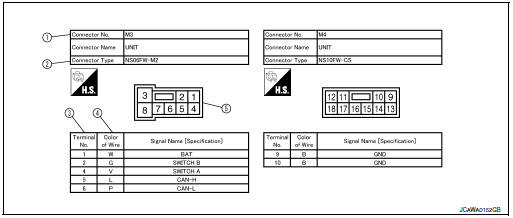
Description
| Number | Item | Description |
| 1 | Connector number |
|
| 2 | Connector type |
|
| 3 | Terminal number |
|
| 4 | Wire color |
|
| B = Black W = White R = Red G = Green L = Blue Y = Yellow LG = Light Green BG = Beige BR = Brown LA = Lavender OR or O = Orange P = Pink PU or V (Violet) = Purple GY or GR = Gray SB = Sky Blue CH = Dark Brown DG = Dark Green |
||
|
||
| 5 | Connector |
|
 Sample/Wiring Diagram -Example-
Each section includes wiring diagrams.
Description
Number
Item
Description
1
Power supply
This means the power supply of fusible link or fuse.
...
 Abbreviations
Abbreviation List
The following ABBREVIATIONS are used:
...
Other materials:
How to switch the display
With the ignition switch in the ON position, press
the CAMERA button or move the shift lever to the
R (Reverse) position to operate the Around View
Monitor.
The Around View Monitor displays different split
screen views depending on the position of the
shift lever. Press the CAMERA button to ...
Harness connector
Description
HARNESS CONNECTOR (TAB-LOCKING TYPE)
The tab-locking type connectors help prevent accidental looseness
or disconnection.
The tab-locking type connectors are disconnected by pushing or
lifting the locking tab(s). Refer to the figure
below.
Refer to the next p ...
C1120, C1122, C1124, C1126 ABS in valve system
DTC Logic
DTC DETECTION LOGIC
DTC
Display Item
Malfunction detected condition
Possible causes
C1120
FR LH IN ABS SOL
When a malfunction is detected in front LH ABS IN
valve.
Harness or connector
ABS actuator and electric unit
(control uni ...
