
Nissan Rogue Service Manual: Rear disc brake
BRAKE PAD
BRAKE PAD : Inspection
INSPECTION
Check brake pad wear thickness from an inspection hole (A) on cylinder body. Check using a scale if necessary.
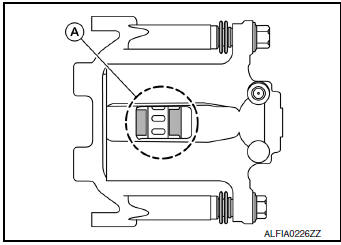
Wear thickness : Refer to BR-55, "Rear Disc Brake".
DISC BRAKE ROTOR
DISC BRAKE ROTOR : Inspection
Appearance
Check surface of disc brake rotor for uneven wear, cracks or damage. Replace if any abnormal conditions exist.
Runout
- Check the wheel bearing axial end play before the inspection. Refer to RAX-6, "Inspection"(FWD) or RAX- 14, "Inspection"(AWD).
- Secure the disc brake rotor to the wheel hub and bearing with wheel nuts at two wheel nut locations.
- Measure the runout with a dial gauge 10 mm (0.39 in) from the disc brake rotor edge.
Runout : Refer to BR-55, "Rear Disc Brake".
- Find the installation position with a minimum runout by shifting the disc brake rotor-to-wheel hub and bearing installation position by one hole at a time if the runout exceeds the limit value.
- Refinish the disc brake rotor if the runout is outside the limit even after performing the above operation. When refinishing, use Tool.
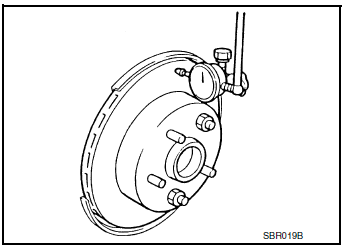
Tool number : 38-PFM92
CAUTION:
- Check in advance that the thickness of the disc brake rotor is wear thickness + 0.3 mm (0.012 in) or more.
- If the thickness is less than wear thickness + 0.3 mm (0.012 in), replace the disc brake rotor.
Wear thickness : Refer to BR-55, "Rear Disc Brake".
Thickness
Check the thickness of the disc brake rotor using a micrometer.
Replace the disc brake rotor if the thickness is below the minimum thickness.
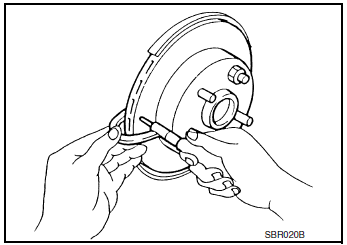
Minimum thickness : Refer to BR-55, "Rear Disc
Brake".
Thickness variation : Refer to BR-55, "Rear Disc
Brake".
 Front disc brake
BRAKE PAD
BRAKE PAD : Inspection
Check brake pad wear thickness from an inspection hole (A) on cylinder
body. Check using a scale if necessary.
Wear thickness : Refer to BR-55, "Front Dis ...

Other materials:
Periodic maintenance
REAR PROPELLER SHAFT
Inspection
APPEARANCE AND NOISE
Check the propeller shaft tube surface for dents or cracks. If
malfunction is detected, replace propeller shaft
assembly.
If center bearing is noisy or damaged, replace propeller shaft
assembly.
VIBRATION
If vibrati ...
Back door window glass
Exploded View
Back door window glass
Clip
Clip
Removal and Installation
REMOVAL
Remove back door finisher. Refer to INT-38, "Removal and
Installation".
Remove back door lock. Refer to DLK-263, "DOOR LOCK : Removal and
Installation" (for i ...
P0075 intake valve timing control
DTC Description
DTC DETECTION LOGIC
DTC No.
CONSULT screen terms
(Trouble diagnosis content)
DTC detecting condition
P0075
INT/V TIM V/CIR-B1
(Intake valve control solenoid circuit bank 1)
ECM detects an abnormal voltage in the intake valve timing
co ...
