
Nissan Rogue Owners Manual: NISSAN Intelligent Key® battery discharge (if so equipped)
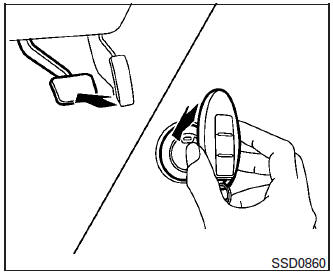
NISSAN Intelligent Key® battery discharge
If the battery of the NISSAN Intelligent Key® is discharged, or environmental conditions interfere with the Intelligent Key operation, start the engine according to the following procedure:
- Place the shift lever in the P (Park) position.
- Firmly apply the foot brake.
- Touch the ignition switch with the Intelligent Key as illustrated. (A chime will sound.)
After step 3 is performed, when the ignition switch is pushed without depressing the brake pedal, the ignition switch position will change to ON.
- Push the ignition switch while depressing the brake pedal within ten seconds after the chime sounds. The engine will start.
NOTE:
- When the ignition switch is pushed to the
ON position or the engine is started by the
above procedure, the Intelligent Key battery
discharge indicator appears in the vehicle
information display even when the Intelligent
Key is inside the vehicle. This is not a malfunction.
To turn off the Intelligent Key battery discharge indicator, touch the ignition switch with the Intelligent Key again.
- If the Intelligent Key battery discharge indicator appears, replace the battery as soon as possible. For additional information, refer to “Battery Replacement� in the “Maintenance and do-it-yourself� section of this manual.
 Push-button ignition switch positions
LOCK (Normal parking position):
The ignition switch can only be locked in this
position.
The ignition switch will lock when any door is
opened or closed with the ignition switched off.
ON (Norm ...
 NISSAN vehicle immobilizer system
The NISSAN Vehicle Immobilizer system will not
allow the engine to start without the use of the
registered key.
If the engine fails to start using a registered key
(for example, when interferenc ...
Other materials:
C1198 vacuum sensor
DTC Logic
DTC DETECTION LOGIC
DTC
Display Item
Malfunction detected condition
Possible causes
C1198
VACUUM SEN CIR
When an open circuit is detected in vacuum sensor
circuit.
When a short circuit is detected in vacuum sensor
circuit.
&nb ...
Glove box assembly and housing
Removal and Installation
REMOVAL
Release instrument side finisher (RH) (1) pawls using a suitable
tool and remove.
: Pawl
NOTE:
LH side shown; RH similar.
Release the glove box damper (1) from the glove box assembly
(2) as shown.
Release the glove box assembly pawls ...
Unexpected brake pedal reaction
Description
A malfunction of brake pedal feel (height or others) is detected when brake
pedal is depressed.
Diagnosis Procedure
1.CHECK FRONT AND REAR AXLE
Check that there is no excessive looseness in front and rear axle.
2WD: Refer to FAX-7, "Inspection" (front) or RAX-6, ...
