
Nissan Rogue Owners Manual: Heater and Air Conditioner (automatic) (if so equipped)
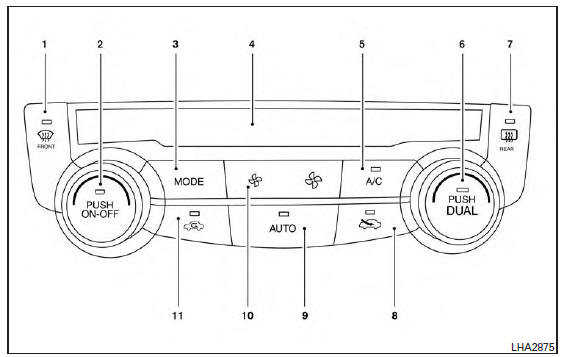
Heater and Air Conditioner
 (front defroster) button
- Temperature control dial (driver’s side) / ON-OFF button
- MODE (manual air flow control) button
- Display screen
- A/C (air conditioner) button
- Temperature control dial (passenger’s side)/DUAL (passenger’s side temperature control) button
-
 (rear window and
outside mirror
(if so equipped) defroster) button
(rear window and
outside mirror
(if so equipped) defroster) button -
 Fresh air intake
button
Fresh air intake
button - AUTO (automatic mode) button
-
 (fan speed control)
buttons
(fan speed control)
buttons -
 Air recirculation
button
Air recirculation
button
WARNING
|
NOTE:
- Odors from inside and outside the vehicle can build up in the air conditioner unit. Odor can enter the passenger compartment through the vents.
- When parking, set the heater and air conditioner
controls to turn off air recirculation to
allow fresh air into the passenger compartment.
This should help reduce odors inside the vehicle.
 Air flow charts
The following charts show the button and dial
positions for MAXIMUM AND QUICK heating,
cooling or defrosting. The air recirculation indicator
should always be in the OFF position
for heating and d ...
 Automatic operation
Cooling and/or dehumidified heating
(AUTO)
This mode may be used all year round as the
system automatically works to keep a constant
temperature. Air flow distribution and fan speed
are also cont ...
Other materials:
P0181 FTT sensor
DTC Description
DTC DETECTION LOGIC
DTC No.
CONSULT screen terms
(Trouble diagnosis content)
DTC detecting condition
P0181
FTT SENSOR
(Fuel temperature sensor ″A″ circuit range/
performance)
A
Rationally incorrect voltage from the sensor is sent ...
System
System Diagram
Compressor
Pressure relief valve
Liquid tank
Refrigerant pressure sensor
Condenser
Expansion valve
Evaporator
Blower motor
High-pressure gas
High-pressure liquid
Low-pressure liquid
Low-pressure gas
Suction port
Discharge port ...
Precaution
Precaution for Supplemental Restraint System (SRS) "AIR BAG" and "SEAT
BELT
PRE-TENSIONER"
The Supplemental Restraint System such as “AIR BAG� and “SEAT BELT PRE-TENSIONER�,
used along
with a front seat belt, helps to reduce the risk or severity of injury to the
...
