
Nissan Rogue Service Manual: Symptom diagnosis
COMBINATION SWITCH SYSTEM SYMPTOMS
Symptom Table
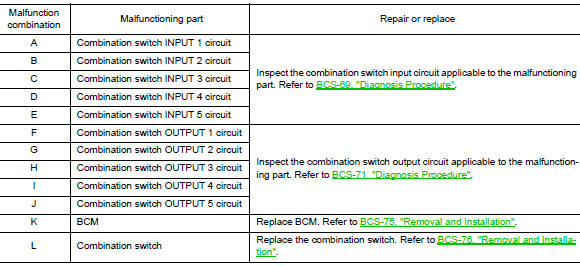
- Perform the data monitor of CONSULT to check for any malfunctioning item.
- Check the malfunction combinations.

- Identify the malfunctioning part from the agreed combination and repair or replace the part.
NORMAL OPERATING CONDITION
Description
SHIPPING MODE
- Shipping mode inhibits battery power consumption during transportation or storage of the vehicle. Vehicle is set to shipping mode before being shipped from the factory.
- When ignition switch is OFF, BCM operates shipping mode.
- BCM control function is limited in shipping mode. Remote keyless entry function is not operated during the shipping mode.
- For shipping mode cancel operation, refer to BCS-63, "Work Procedure".
NOTE: Do not cancel shipping mode during storage of the vehicle. Always cancel shipping mode before delivery of the vehicle to customer.
 DTC/circuit diagnosis
U1000 CAN COMM CIRCUIT
Description
Refer to LAN-8, "System Description".
DTC Logic
DTC DETECTION LOGIC
NOTE:
U1000 can be set if a module harness was disconnected and reconnected, perh ...
 Removal and installation
BCM (BODY CONTROL MODULE)
Removal and Installation
CAUTION:
Before replacing the BCM, perform “READ CONFIGURATION� to save or print current
vehicle specification.
Refer to BCS-60, "AD ...
Other materials:
Changing engine oil
Changing engine oil
Park the vehicle on a level surface and apply
the parking brake.
Start the engine and let it idle until it reaches
operating temperature, then turn it off.
Remove the oil filler cap B by turning it
counterclockwise.
Place a large drain pan u ...
Retained power operation does not operate properly
Diagnosis Procedure
1.CHECK FRONT DOOR SWITCH
Check (LH and RH) front door switches.
Refer to DLK-24, "Front Door Switch".
Is the inspection result normal?
YES >> GO TO 2.
NO >> Repair or replace the malfunctioning parts.
2.CONFIRM THE OPERATION
Confirm the operat ...
Rear washer nozzle and tube
Exploded View
Rear washer tube
Rear grommet
Clip
Removal and Installation - Rear Washer Nozzle
REMOVAL
Remove rear access panel. Refer to INT-38, "Exploded View".
Release pawls and remove rear washer nozzle (1).
: Pawl
INSTALLATION
Installation in the ...
