
Nissan Rogue Service Manual: Removal and installation
BCM (BODY CONTROL MODULE)
Removal and Installation
CAUTION: Before replacing the BCM, perform “READ CONFIGURATION� to save or print current vehicle specification.
Refer to BCS-60, "ADDITIONAL SERVICE WHEN REPLACING CONTROL UNIT (BCM) : Work Procedure".
REMOVAL
- Disconnect the negative battery terminal. Refer to PG-77, "Removal and Installation".
- Remove the instrument lower panel LH. Refer to IP-22, "Removal and Installation".
- Remove the bolt (A), then pull out the BCM (1).
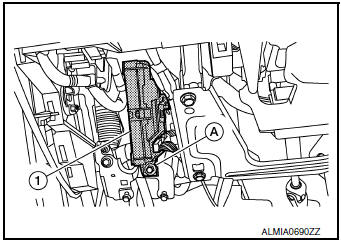
- Disconnect the harness connectors from the BCM and remove.
INSTALLATION
Installation is in the reverse order of removal.
CAUTION:
- When replacing BCM, perform “WRITE CONFIGURATION� Refer to BCS-61, "CONFIGURATION (BCM) : Work Procedure".
- When replacing BCM, perform the system initialization (NATS). Refer to the CONSULT immobilizer mode and follow the on-screen instructions.
- When replacing BCM, if new BCM does not come with keyfobs attached, all existing keyfobs must be re-registered. Refer to the CONSULT immobilizer mode and follow the on screen instructions.
COMBINATION SWITCH
Exploded View
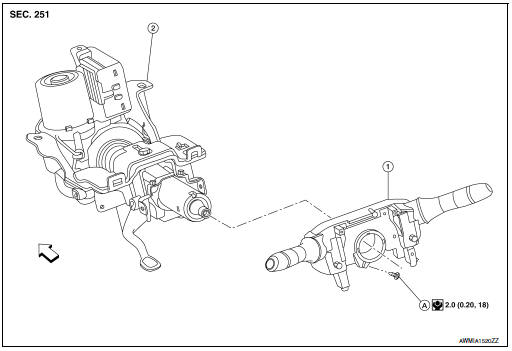
- Combination switch
- Steering column
- Screw
 Front
Front
Removal and Installation
REMOVAL
- Remove the steering angle sensor. Refer to BRC-139, "Removal and Installation".
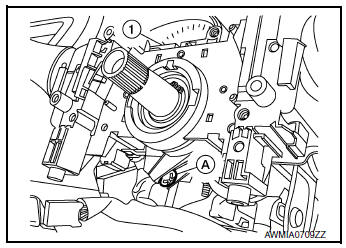
- Disconnect harness connector from combination switch.
- Remove screw (A) and combination switch (1).
INSTALLATION
Installation is in the reverse order of removal.
 Symptom diagnosis
COMBINATION SWITCH SYSTEM SYMPTOMS
Symptom Table
Perform the data monitor of CONSULT to check for any malfunctioning
item.
Check the malfunction combinations.
Identify the malfunct ...

Other materials:
Rear disc brake
BRAKE PAD
BRAKE PAD : Exploded View
Sliding pin bolt
Sliding pin bushing
Cylinder body
Inner shim cover
Inner shim
Inner pad
Pad retainer
Torque member
Outer pad
Outer shim
Outer shim cover
Molykote AS-880N
Niglube Rx-2
BRAKE PAD : Re ...
Diagnosis system (combination meter)
Description
COMBINATION METER SELF-DIAGNOSIS MODE
The following meter functions can be checked during Combination Meter
Self-Diagnosis Mode:
Pointer sweep of speedometer, tachometer and gauges.
Illumination of all LCD segments and color patterns for meter
displays.
I ...
Anti-pinch function does not operate
MOONROOF
MOONROOF : Diagnosis Procedure
1. PERFORM INITIALIZATION PROCEDURE
Perform initialization procedure.
Refer to RF-24, "ADDITIONAL SERVICE WHEN REPLACING CONTROL UNIT : Special Repair
Requirement".
Is the inspection result normal?
YES >> GO TO 2.
NO >> Per ...
