
Nissan Rogue Service Manual: Removal and installation
IPDM E/R (INTELLIGENT POWER DISTRIBUTION MODULE ENGINE ROOM)
Exploded View
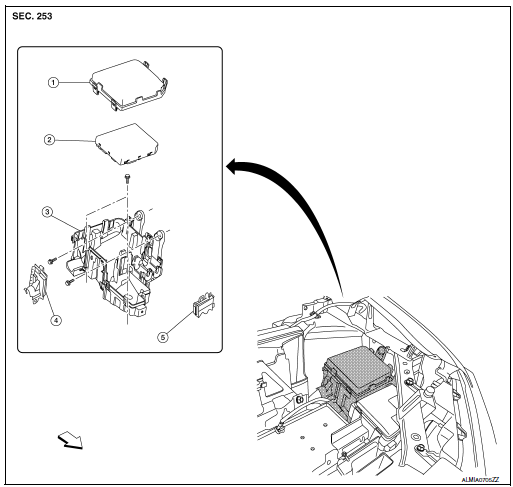
- IPDM E/R cover
- IPDM E/R
- IPDM E/R case
- IPDM E/R harness cover A
- IPDM E/R harness cover B
 Front
Front
Removal and Installation
CAUTION: IPDM E/R integrated relays are not serviceable parts, do not remove from the IPDM E/R.
REMOVAL
- Disconnect the negative battery terminal. Refer to PG-75, "Removal and Installation (Battery)".
- Remove air duct (inlet). Refer to EM-24, "Exploded View".
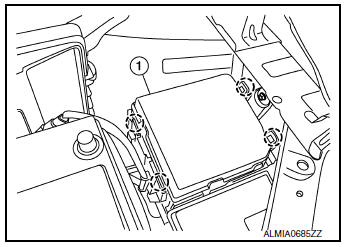
- Release pawls on IPDM E/R cover (1) and remove.
 : Pawls
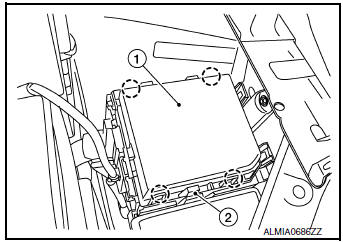
- Release pawls and remove IPDM E/R (1) from the IPDM E/R
case (2).
 : Pawls
- Disconnect the harness connectors from IPDM E/R (1).
CAUTION: Replace the IPDM E/R if it has been dropped or sustained an impact.

- Release the negative battery cable and harness clips from the IPDM E/R case.
- Release the pawls on the IPDM/ E/R harness covers A, B and remove from the IPDM E/R case.
- Remove the bolts from the IPDM E/R case.
- Remove the bolt (A) from the fusible link box (battery).

- Release the pawls on the fusible link box (battery) case (2) and
remove from the IPDM E/R case (1).: Pawls

INSTALLATION
Installation is in the reverse order of removal.
 DTC/circuit diagnosis
U1000 CAN COMM CIRCUIT
Description
Refer to LAN-8, "System Description".
DTC Logic
DTC DETECTION LOGIC
CONSULT Display
DTC Detection Condition
Possible Cause
...

Other materials:
Combination meter
Reference Value
VALUES ON THE DIAGNOSIS TOOL
*: DDS (hill descent control)
NOTE:
Some items are not available according to vehicle specification.
TERMINAL LAYOUT
PHYSICAL VALUES
Fail-safe
The combination meter activates the fail-safe control if the CAN
communica ...
B0020 side airbag module IH
Description
DTC B0020 FRONT LH SIDE AIR BAG MODULE
The front LH side air bag module is wired to the air bag diagnosis sensor
unit. The air bag diagnosis sensor
unit will monitor for opens and shorts in detected lines to the front LH side
air bag module.
PART LOCATION
Refer to SRC-6, "C ...
Both doors mirror defogger don’t operate but rear window defogger operates
Diagnosis Procedure
Regarding Wiring Diagram information, refer to DEF-12, "Wiring Diagram".
1. CHECK DOOR MIRROR DEFOGGER FUSE
Check if the following fuse in fuse block (J/B) is blown.
Is the inspection result normal?
YES >> GO TO 2.
NO >> Replace the blown fuse af ...
