
Nissan Rogue Owners Manual: NISSAN Jackknife key (if so equipped)
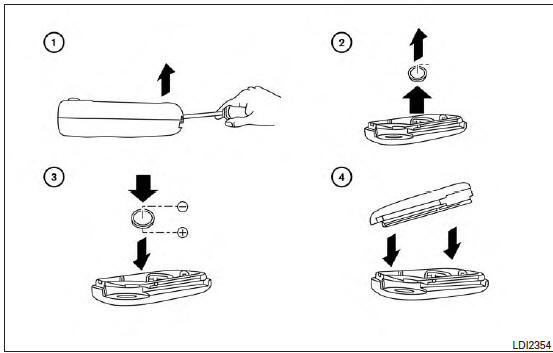
Replace the battery in the jackknife key as follows:
- Hold jackknife key button side up. Insert a small screwdriver into the slit of the corner and twist it to separate the upper part from the lower part. Use a cloth to protect the casing.
- Remove old battery.
- Replace the battery with a now one.
Recommended battery: CR2032 or equivalent.
- Do not touch the internal circuit and electric terminals as doing so could cause a malfunction.
- Hold the battery by the edges. Holding the battery across the contact points will seriously deplete the storage capacity.
- Close lid securely as illustrated.
Operate the buttons to check the operation.
See a NISSAN dealer if you need assistance for replacement.
NOTE: Changes or modifications not expressly approved by the party responsible for compliance could void the user’s authority to operate the equipment.
 Battery replacement
CAUTIONBe careful not to allow children to swallow
the battery or removed parts.
...
 NISSAN Intelligent Key® (if so equipped)
Replace the battery in the Intelligent Key as follows:
Remove the mechanical key from the Intelligent
Key.
Insert a small screwdriver A into the slit B
of the corner and twist it to se ...
Other materials:
Steering wheel turning force is heavy or light
Description
Steering wheel turning force is heavy or light.
Diagnosis Procedure
1.PERFORM SELF-DIAGNOSIS
With CONSULT
Turn the ignition switch OFF to ON.
Perform “EPS� self-diagnosis.
Is any DTC detected?
YES >> Check the DTC. Refer to STC-13, "DTC Index" ...
Preparation
Special Service Tool
The actual shape of the tools may differ from those illustrated here.
Tool number
(TechMate No.)
Tool name
Description
—
(J-50190)
Signal Tech II
Activate and display TPMS transmitter IDs
Display tire pressure ...
The braking distance is long
Description
Brake stopping distance is long when ABS function is operated.
Diagnosis Procedure
CAUTION:
Brake stopping distance on slippery road like rough road, gravel road or snowy
road may become
longer when ABS is operated than when ABS is not operated
1.CHECK BRAKING FORCE
Check brake ...
