
Nissan Rogue Service Manual: Removal and installation
HORN
Exploded View
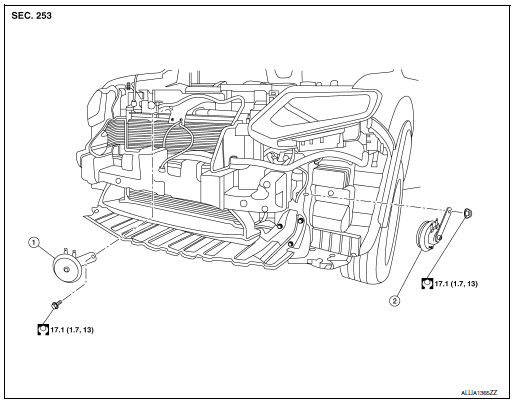
- Horn (LOW)
- Horn (HIGH)
Removal and Installation
REMOVAL
Horn (LOW)
- Remove the front grille. Refer to EXT-23, "Removal and Installation".
- Disconnect the harness connectors from the horn (LOW).
NOTE: Before disconnecting the harness connectors, mark each for proper connection during installation.
- Remove bolt and the horn (LOW).
Horn (HIGH)
- Remove the engine side cover. Refer to EXT-28, "FENDER PROTECTOR : Exploded View".
- Partially remove the fender protector LH (front). Refer to EXT-28, "FENDER PROTECTOR : Exploded View".
- Disconnect the harness connectors from horn (HIGH).
NOTE: Before disconnecting the harness connectors, mark each for proper connection during installation.
- Remove nut and the horn (HIGH).
INSTALLATION
Installation is in the reverse order of removal.
 Wiring diagram
HORN
Wiring Diagram
...

Other materials:
Operating tips
CAUTION
Do not use alcohol, benzine or thinner
to clean the camera. This will cause
discoloration. To clean the camera,
wipe with a cloth dampened with a diluted
mild cleaning agent and then wipe
with a dry cloth.
Do not damage the camera as the monitor ...
Periodic maintenance
Introduction of Periodic Maintenance
The following tables show the normal maintenance schedule. Depending upon
weather and atmospheric conditions,
varying road surfaces, individual driving habits and vehicle usage, additional
or more frequent maintenance
may be required.
Periodic maintenan ...
P0520 EOP sensor
DTC Description
DTC DETECTION LOGIC
DTC No.
CONSULT screen terms
(Trouble diagnosis content)
DTC detecting condition
P0520
EOP SENSOR/SWITCH
(Engine oil pressure sensor/switch circuit)
Signal voltage from the EOP sensor remains at more than 5.02 V /
less than
...
