
Nissan Rogue Service Manual: Rear door finisher
Exploded View
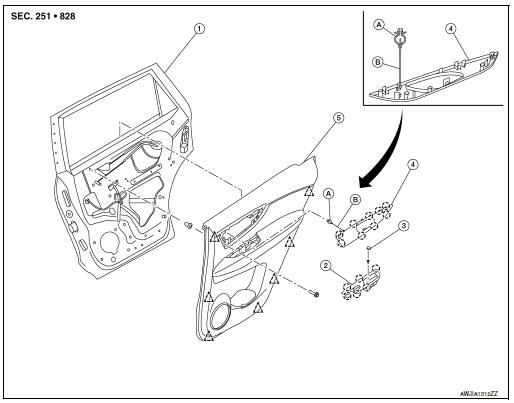
- Rear door
- Rear power window switch finisher
- Rear door screw cover
- Rear door inside handle finisher
- Rear door finisher
- Tether clip
- Tether
 Pawl
Pawl
 Clip
Clip
Removal and Installation
REMOVAL
- Remove screw cover (1).
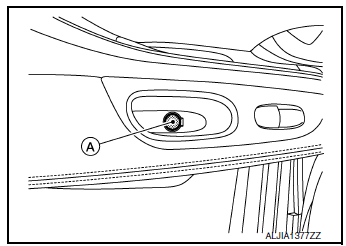
- Remove screw (A).

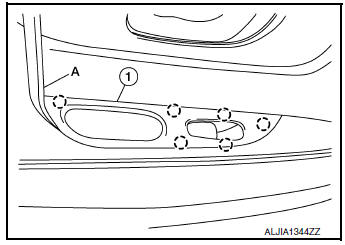
- Release pawls using a suitable tool (A) and remove rear power window switch finisher (1).
 : Pawl
- Disconnect harness connector from rear power window switch finisher.
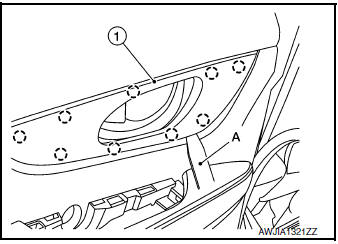
- Release pawls using a suitable tool (A) and remove rear door inside handle finisher (1).
 : Pawl
- Release clip and remove tether from the front door panel.
- Release clips using a suitable tool (A) and remove rear door finisher (1).
 : Clip
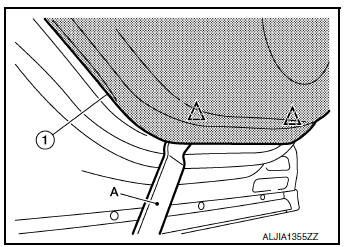
INSTALLATION
Installation is in the reverse order of removal.
CAUTION:
- Visually check the clips and pawls for deformation and damage during installation. Replace with new ones if necessary.
- When installing rear door finisher, check that clips and pawls are securely placed in door panel holes.
 Front door finisher
Exploded View
Front door
Front door pull handle bracket
Front door pull handle
Front power window switch (RH)
finisher
Front door inside handle finisher
Front door finisher
C ...
 Body side trim
Exploded View
Front pillar finisher
Front body side welt
Center pillar upper finisher
Rear body side welt
Rear kicking plate
Seat belt cover
Center pillar lower fin ...
Other materials:
B terminal circuit
Description
“B� terminal circuit supplies power to charge the battery and to operate the
vehicles electrical system.
Diagnosis Procedure
Regarding Wiring Diagram information. Refer to CHG-7, "Wiring Diagram".
1.CHECK “B� TERMINAL CONNECTION
Turn ignition switch OFF. ...
Engine compartment check locations
Engine compartment check locations
QR25DE engine
Engine coolant reservoir
Engine oil filler cap
Brake fluid reservoir
Battery
Air cleaner
Fuse/Fusible link box
Radiator cap
Engine oil dipstick
Drive belt location
...
C1144 incomplete steering angle sensor adjustment
DTC Logic
DTC DETECTION LOGIC
DTC
Display Item
Malfunction detected condition
Possible causes
C1144
ST ANG SEN SIGNAL
When neutral position adjustment of steering angle
sensor is not complete.
Harness or connector
Steering angle sensor
&n ...
