
Nissan Rogue Service Manual: Front door finisher
Exploded View
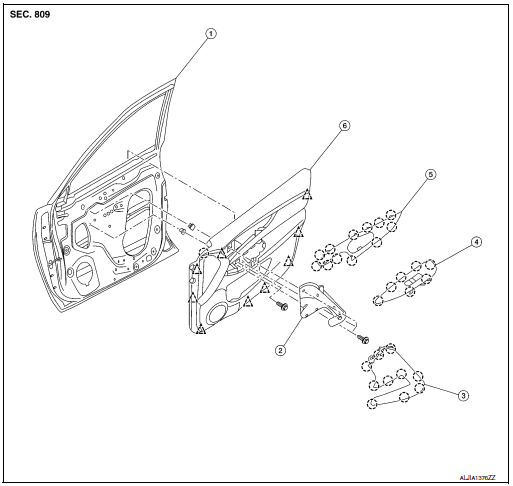
- Front door
- Front door pull handle bracket
- Front door pull handle
- Front power window switch (RH) finisher
- Front door inside handle finisher
- Front door finisher
 Clip
Clip
 Pawl
Pawl
REMOVAL
NOTE: LH shown, RH similar.
- Release pawls using a suitable tool (A) from front of inside handle finisher (1) while working toward the rear and remove.
: Pawl
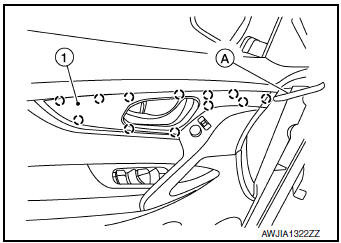
- Release pawls using a suitable tool (A) from front of inside handle finisher (1) while working toward the rear and remove.
: Pawl
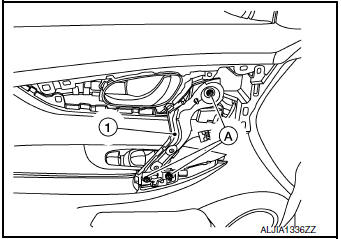
- Disconnect harness connector from door mirror remote control switch (LH only).
- Remove bolts (A) and front door inside pull handle bracket (1).
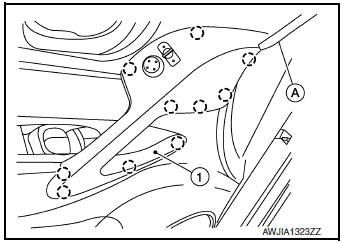
- Release pawls using a suitable tool (A) and remove front door power window and door lock/unlock switch finisher (1).
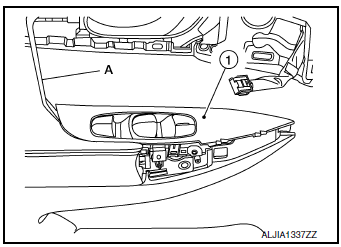
- Disconnect harness connectors from front door power window and door lock/unlock switch.
- Remove front door finisher bolt (A).
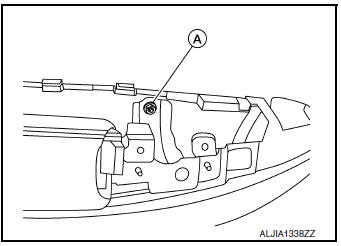
- Insert suitable tool (A) between front door finisher and door panel to release clips and pawl, starting from the bottom and working to the top.
 : Clip

INSTALLATION
Installation is in the reverse order of removal.
CAUTION:
- Visually check the clips and pawls for deformation and damage during installation. Replace with new ones if necessary.
- When installing front door finisher, check that clips and pawls are securely placed in door panel holes.
NOTE: When main power window and door lock/unlock switch or power window door lock/unlock switch RH is removed or replaced, it is necessary to perform the initialization procedure. Refer to PWC-25, "Work Flow".

 Rear door finisher
Exploded View
Rear door
Rear power window switch finisher
Rear door screw cover
Rear door inside handle finisher
Rear door finisher
Tether clip
Tether ...
Other materials:
Rear washer nozzle and tube
Exploded View
Rear washer tube
Rear grommet
Clip
Removal and Installation - Rear Washer Nozzle
REMOVAL
Remove rear access panel. Refer to INT-38, "Exploded View".
Release pawls and remove rear washer nozzle (1).
: Pawl
INSTALLATION
Installation in the ...
P0172 fuel injection system function
DTC Description
DTC DETECTION LOGIC
With the Air/Fuel Mixture Ratio Self-Learning Control, the actual mixture
ratio can be brought closely to the
theoretical mixture ratio based on the mixture ratio feedback signal from the
A/F sensors 1. The ECM calculates
the necessary compensation to corr ...
Additional service when replacing transaxle assembly
Description
Perform the following work after the transaxle assembly is replaced.
WRITING TCM DATA
TCM performs accurate control by retrieving data (inherent
characteristic value) of each solenoid. For this
reason, after replacing transaxle assembly, it is necessary to write new
d ...
