
Nissan Rogue Owners Manual: NISSAN Intelligent Key® Operation
NISSAN Intelligent Key® Operation
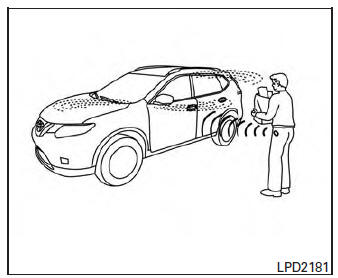
You can lock or unlock the doors without taking the Intelligent Key out of your pocket or bag.
When you carry the Intelligent Key with you, you can lock or unlock all doors by pushing the door handle request switch within the range of operation.
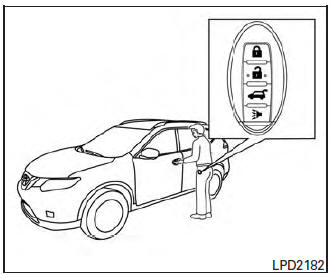
Locking doors
- Move the shift lever to the P (Park) position, place the ignition switch in the LOCK position and make sure you carry the Intelligent Key with you.
- Close all doors.
- Push any door handle request switch while carrying the Intelligent Key with you.
- All doors and the rear liftgate will lock.
- The hazard warning lights flash twice and the outside buzzer sounds twice.
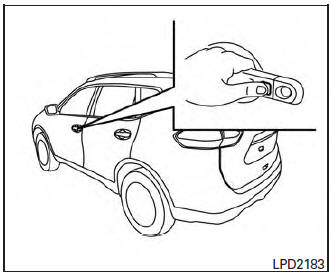
Locking doors
- Request switches for all doors and liftgate can be deactivated when the I-Key Door Lock setting is switched to OFF in the Vehicle Settings of the vehicle information display. For additional information, refer to “Vehicle information display� in the “Instruments and controls� section of this manual.
- Doors lock with the door handle request switch while the ignition switch is not in the LOCK position.
- Doors do not lock by pushing the door handle request switch while any door is open. However, doors lock with the mechanical key even if any door is open.
- Doors do not lock with the door handle
request switch with the Intelligent Key inside
the vehicle and a beep sounds to warn you.
However, when an Intelligent Key is inside the vehicle, doors can be locked with another Intelligent Key.
CAUTION
|
Lockout protection
To prevent the Intelligent Key from being accidentally locked in the vehicle, lockout protection is equipped with the Intelligent Key system.
When the driver’s side door is open, the doors are locked, and then the Intelligent Key is put inside the vehicle and all the doors are closed; the lock will automatically unlock and the door buzzer sounds.
NOTE: The doors may not lock when the Intelligent Key is in the same hand that is operating the request switch to lock the door.
Put the Intelligent Key in a purse, pocket or your other hand.
| CAUTION The lockout protection may not function under the following conditions:
|
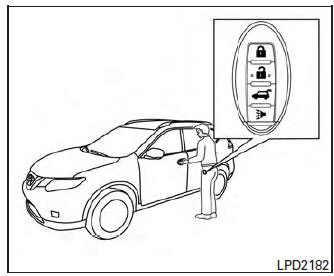
Unlocking doors
- Carry the Intelligent Key.
- Push the door handle request switch.
- The hazard warning lights flash once and the outside buzzer sounds once.
- Push the door handle request switch again within one minute to unlock all doors.
For power liftgate opening:
- Carry the Intelligent Key.
- Press the power liftgate request switch.
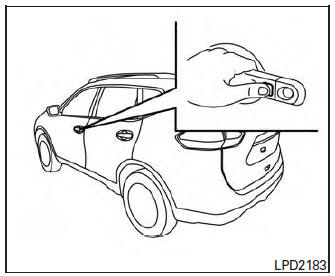
NOTE: Request switches for all doors and liftgate can be deactivated when the I-Key Door Lock setting is switched to OFF in the Vehicle Settings of the vehicle information display. For additional information, refer to “Vehicle information display� in the “Instruments and controls� section of this manual. If a door handle is pulled while unlocking the doors, that door may not be unlocked. Returning the door handle to its original position will unlock the door. If the door does not unlock after returning the door handle, push the door handle request switch to unlock the door.
All doors will be locked automatically unless one of the following operations is performed within one minute after pushing the request switch.
- Opening any door.
- Pushing the ignition switch.
The interior light timer illuminates for a period of time when a door is unlocked and the room light switch is in the DOOR position.
The interior light can be turned off without waiting by performing one of the following operations:
- Placing the ignition switch in the ON position.
- Locking the doors with the remote control.
- Switching the room light switch to the OFF position.
- Switching the Auto Room Lamp to the OFF position in Vehicle Settings of the vehicle information display. For additional information, refer to “Vehicle information display� in the “Instruments and controls� section.
 Door locks/unlocks precaution
Door locks/unlocks precaution
Do not push the door handle request switch
with the Intelligent Key held in your hand as
illustrated. The close distance to the door
handle will cause the I ...
 How to use the remote keyless entry
function
How to use the remote keyless entry
function
The remote keyless entry function can operate all
door locks using the remote keyless function of
the Intelligent Key. The remote keyless function
can operate at a distance of 33 ft (10 m) away
fr ...
Other materials:
Preparation
Special Service Tool
The actual shape of the tools may differ from those illustrated here.
Tool number
(TechMate No.)
Tool name
Description
—
(J-46534)
Trim Tool Set
Removing trim components
Commercial Service Too
(TechMate No.)
...
Intake manifold
Exploded View
Intake manifold
Intake manifold gasket
Electirc throttle control actuator O-ring
Electric throttle control actuator
Removal and Installation
REMOVAL
WARNING:
To avoid danger of being scalded, do not drain engine coolant when engine is
hot.
N ...
Door mirror glass
Removal and Installation
REMOVAL
Release the metal clips and pawls that retain the door mirror
glass using a suitable tool, disconnect the harness connectors
(A) (if equipped) from the door mirror glass and remove.
Metal clip
: Pawl
INSTALLATION
Installation is in the rever ...
