
Nissan Rogue Owners Manual: How to use the remote keyless entry function
The remote keyless entry function can operate all door locks using the remote keyless function of the Intelligent Key. The remote keyless function can operate at a distance of 33 ft (10 m) away from the vehicle. The operating distance depends upon the conditions around the vehicle.
The remote keyless entry function will not function under the following conditions:
- When the Intelligent Key is not within the operational range.
- When the doors or the rear liftgate are open or not closed securely.
- When the Intelligent Key battery is discharged.
| CAUTION When locking the doors using the Intelligent Key, be sure not to leave the key in the vehicle. |
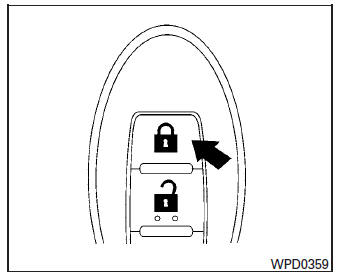
Locking doors
- Place the ignition switch in the LOCK position.
- Close all doors.
- Press the
 button on
the Intelligent
Key.
button on
the Intelligent
Key. - The hazard warning lights flash twice and the horn beeps once.
- All doors will be locked.
| CAUTION After locking the doors using the Intelligent Key, be sure that the doors have been securely locked by operating the door handles. |
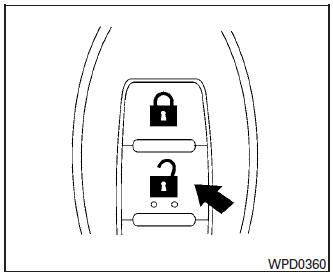
Unlocking doors
- Press the
 button on
the Intelligent
Key.
button on
the Intelligent
Key. - The hazard warning lights flash once.
- Press the
 button
again within five
seconds to unlock all doors.
button
again within five
seconds to unlock all doors.
NOTE:
The unlocking operation can be changed in
Selective door unlock in the Vehicle Settings
of the vehicle information display. For
additional information, refer to “Vehicle information
display� in the “Instruments and
controls� section of this manual.
All doors will be locked automatically unless one
of the following operations is performed within
one minute after pressing the  button:
- Opening any doors.
- Pushing the ignition switch.
The interior light illuminates for a period of time when a door is unlocked and the room light switch is in the DOOR position.
The light can be turned off without waiting by performing one of the following operations:
- Placing the ignition switch in the ON position.
- Locking the doors with the Intelligent Key.
- Switching the room light switch to the OFF position.
- Switching the Auto Room Lamp to the OFF position in Vehicle Settings of the vehicle information display. For additional information, refer to “Vehicle information display� in the “Instruments and controls� section of this manual.
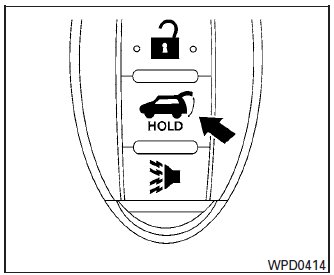
Releasing the rear liftgate (if so equipped)
The rear liftgate can be opened and closed by performing the following:
- Press the
 button (if
so equipped) for
longer than 0.5 seconds to open the rear
liftgate.
button (if
so equipped) for
longer than 0.5 seconds to open the rear
liftgate. - Press the
 button (if
so equipped)
again for longer than 0.5 seconds to close
the rear liftgate.
button (if
so equipped)
again for longer than 0.5 seconds to close
the rear liftgate.
When the  button (if so equipped)
is
pressed during the open or close process the
liftgate will reverse.
button (if so equipped)
is
pressed during the open or close process the
liftgate will reverse.
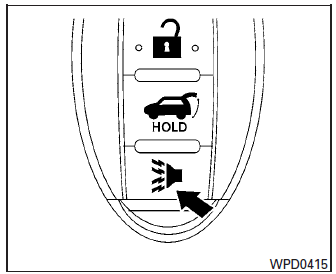
Using the panic alarm
If you are near your vehicle and feel threatened,
you may activate the panic alarm to call attention
by pressing and holding the  button
on the
Intelligent Key for longer than 0.5 seconds.
button
on the
Intelligent Key for longer than 0.5 seconds.
The panic alarm and headlights will stay on for a period of time.
The panic alarm stops when:
- It has run for a period of time, or
- Any button is pressed on the Intelligent Key.
- The request switch on the driver or passenger door is pushed and the Intelligent Key is in range of the door handle.
Using the interior light
Press the  button on the keyfob
once to
turn on the interior lights.
button on the keyfob
once to
turn on the interior lights.
For additional information, refer to “Interior light� in the “Instruments and controls� section in this manual.
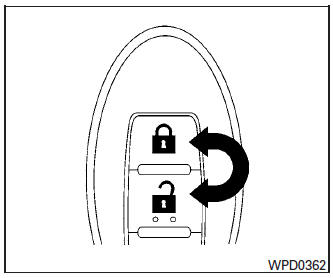
Answer back horn feature
If desired, the answer back horn feature can be
deactivated using the Intelligent Key. When deactivated
and the LOCK button is
pushed, the hazard indicator lights flash twice.
When the UNLOCK button is pushed,
neither
the hazard indicator lights nor the horn operates.
NOTE:
If you change the answer back horn and
light flash feature with the Intelligent Key,
the vehicle information display screen will
show the current mode after the ignition
switch has been cycled from the OFF to the
ON position. The vehicle information display
screen can also be used to change the
answer back horn mode. For additional information,
refer to “Answer back horn� in
the “Instruments and controls� section of
this manual.
To deactivate: Press and hold the  and buttons for at least 2 seconds.
The hazard warning lights will flash 3 times to confirm that the answer back horn feature has been deactivated.
To activate: Press and hold the  and buttons for at least 2 seconds
once
more.
and buttons for at least 2 seconds
once
more.
The hazard warning lights will flash once and the horn will sound once to confirm that the horn beep feature has been reactivated.
Deactivating the horn beep feature does not silence the horn if the alarm is triggered.
Warning signals
To help prevent the vehicle from moving unexpectedly by erroneous operation of the Intelligent Key or to help prevent the vehicle from being stolen, a chime or buzzer sounds from inside and outside the vehicle and a warning is displayed in the instrument panel.
When a chime or beep sounds or a warning is displayed, be sure to check the vehicle and the Intelligent Key.
For additional information, refer to the “Troubleshooting guide� in this section and “Vehicle information display� in the “Instruments and controls� section of this manual.
 NISSAN Intelligent Key® Operation
NISSAN Intelligent Key® Operation
You can lock or unlock the doors without taking
the Intelligent Key out of your pocket or bag.
When you carry the Intelligent Key with you, you
can lock or ...
 Troubleshooting guide
Verify the location of all Intelligent Keys that are
programmed for the vehicle. If another Intelligent
Key is in range or inside the vehicle, the vehicle
system may respond differently than expect ...
Other materials:
Unit removal and installation
FRONT SUSPENSION MEMBER
Exploded View
Front suspension member
Strut mounting bearing
Rebound stopper insulator
Rebound stopper
Removal and Installation
REMOVAL
Remove the wheel and tire using power tool. Refer to WT-60,
"Removal and Installation&quo ...
Preparation
Special Service Tool
The actual shape of the tools may differ from those illustrated here.
Tool number
(TechMate No.)
Tool name
Description
—
(J-39570)
Chassis Ear
Locating the noise
—
(J-50397)
NISSAN Squeak and Rattle Kit
...
CVT oil warmer
Exploded View
Transaxle assembly
CVT oil warmer
: N·m (kg-m, in-lb)
Removal and Installation
REMOVAL
WARNING:
Do not remove the radiator cap when the engine is hot. Serious burns could occur
from high pressure
engine coolant escaping from the radiator. Wrap a thick cloth around ...
