
Nissan Rogue Service Manual: Key interlock cable
Exploded View
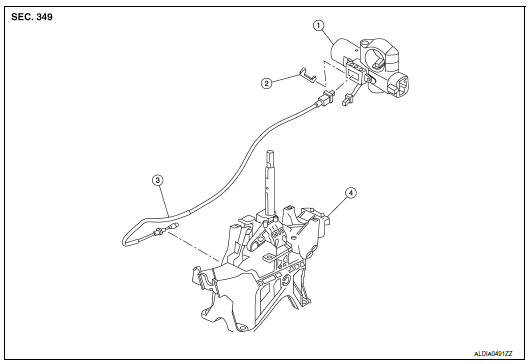
- Key cylinder
- Clip
- Key interlock cable
- Shift selector assembly
Removal and Installation
REMOVAL
CAUTION: Always apply the parking brake before performing removal and installation.
- Move shift selector to the “N� position.
- Remove the shift selector knob.
- Move shift selector to the “P� position.
- Remove the center console assembly. Refer to IP-18, "Removal and Installation".
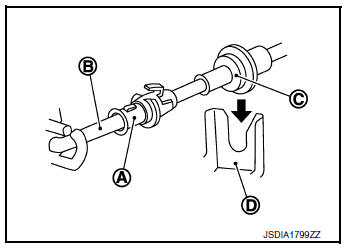
- Press the pawls (B) of the key interlock cable slider (A) while sliding it in the direction of the casing cap (C), and separate the adjusting holder (D) and slider.
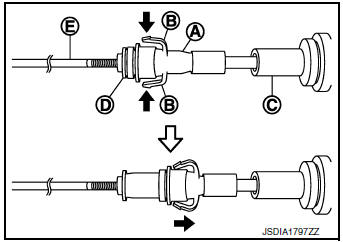
(E) :Key interlock rod
- Remove the key interlock cable from the shift selector.
- Remove the steering column covers. Refer to IP-17, "Removal and Installation".
- Remove instrument lower panel LH. Refer to IP-22, "Removal and Installation".
- Lift clip (A) in the direction of the arrow (
 C) and remove in the
direction of the arrow (
C) and remove in the
direction of the arrow (  D).
D).
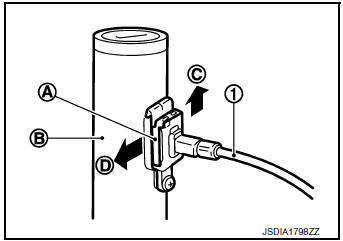
(1) :Key interlock cable
(B) :Key cylinder
- Disconnect the key interlock cable from the key cylinder.
- Disengage the clip and disconnect the key interlock cable from the vehicle.
INSTALLATION
Installation is in the reverse order of removal.
- While pressing the detent rod (B) down ( ), slide the key interlock cable slider (A) toward the key interlock rod (D) side, and install the adjusting holder (C) and key interlock rod.
CAUTION:
- Do not squeeze the pawls on the key interlock cable slider when holding the slider.
- Do not apply force in a perpendicular direction to the key interlock rod when sliding the slider.
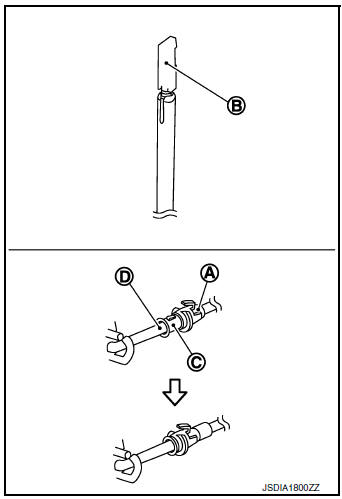
- Install the adjusting holder (A) onto the key interlock rod (B), then install the casing cap (C) onto the shift selector cable bracket (D).
CAUTION:
- When installing the key interlock cable, do not bend or twist the cable forcefully.
- After connecting the key interlock cable to the shift selector cable bracket, be sure to check that the casing cap is completely fastened to the cable bracket. If the casing cap is easily displaced, replace the key interlock cable.
Inspection
INSPECTION AFTER INSTALLATION
- Check the CVT position. If a malfunction is found, adjust the CVT position. Refer to TM-92, "Inspection".
- The key can be removed only when the selector lever is in the “P� position.
- It must not be possible to turn the ignition switch to LOCK when the selector lever is not in the “P� position
 Control cable
Exploded View
Shift selector
Control cable
Retainer grommet
Lock plate
Bracket
Manual lever
Transaxle assembly
Front
Removal and Installation
CAUTION:
Always apply ...
 TCM
TCM
Exploded View
Bracket
Bracket
TCM
: Vehicle front
: N·m (kg-m, in-lb)
Removal and Installation
CAUTION:
Do not impact the TCM when removing or installing TCM.
Wh ...
Other materials:
Vanity mirror lamp
Exploded View
Lens
Bulb
Pawl
Removal and Installation
CAUTION:
Do not attempt to separate the vanity lamp from the sun visor or damage to the
components may
occur.
The vanity lamp is replaced as part of the sun visor. Refer to INT-29, "Exploded
View".
Bulb or Lens ...
Rear power window switch
Description
Rear power window motor will be operated if rear power window switch is
operated.
Component Function Check
1. CHECK REAR POWER WINDOW SWITCH FUNCTION
Check rear power window motor operation with rear power window switch.
Is the inspection result normal?
YES >> Rear power ...
Unit removal and installation
FRONT SUSPENSION MEMBER
Exploded View
Front suspension member
Strut mounting bearing
Rebound stopper insulator
Rebound stopper
Removal and Installation
REMOVAL
Remove the wheel and tire using power tool. Refer to WT-60,
"Removal and Installation&quo ...
