
Nissan Rogue Service Manual: TCM
Exploded View
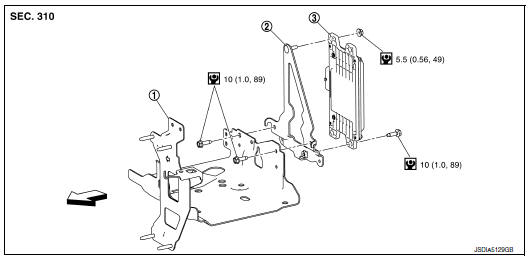
- Bracket
- Bracket
- TCM
 : Vehicle front
 : N·m (kg-m, in-lb)
Removal and Installation
CAUTION:
- Do not impact the TCM when removing or installing TCM.
- When replacing TCM and transaxle assembly as a set, replace transaxle assembly first and then replace TCM. Refer to TM-82, "Description".
- Before replacing TCM, save TCM data using "ADDITIONAL SERVICE
WHEN REPLACING TCM".
Refer to TM-82, "Work Procedure".
- When replacing TCM, note the “CVTF DETERIORATION DATE� value displayed on CONSULT “CONFORM CVTF DETERIORTN� in MAINTENANCE BOOKLET, before start the operation.
REMOVAL
- Disconnect the battery negative terminal. Refer to PG-75, "Exploded View".
- Remove the air duct (inlet). Refer to EM-24, "Exploded View".
- Disconnect the TCM harness connector (A).

(1) : TCM
: Front
- Remove the TCM nuts and remove TCM from bracket.
INSTALLATION
Installation is in the reverse order of removal.
Adjustment
ADJUSTMENT AFTER INSTALLATION
Perform "ADDITIONAL SERVICE WHEN REPLACING TCM". Refer to TM-82, "Description".
 Key interlock cable
Exploded View
Key cylinder
Clip
Key interlock cable
Shift selector assembly
Removal and Installation
REMOVAL
CAUTION:
Always apply the parking brake before perf ...
 Air breather
Exploded View
Air breather
Air breather hose
Air breather tube
Transaxle assembly
: Vehicle front
Removal and Installation
REMOVAL
Remove air cleaner and air duct. Refer ...
Other materials:
Flat towing for All–Wheel drive vehicle
(if so equipped)
Towing your vehicle with all four wheels on the
ground is sometimes called flat towing. This
method is sometimes used when towing a vehicle
behind a recreational vehicle, such as a motor
home.
CAUTION
Failure to follow these guidelines can
result in severe transmission dama ...
Wiring diagram
CHASSIS CONTROL
Wiring Diagram
...
Cooling fan
Exploded View
Fan shroud
Fan motor (LH)
Fan motor (RH)
Cooling fan (RH)
Cooling fan (LH)
Front
Removal and Installation
REMOVAL
WARNING:
Do not remove the radiator cap when the engine is hot. Serious burns could occur
from high pressure
engine coolant escap ...
