
Nissan Rogue Service Manual: Front wiper arm
Exploded View
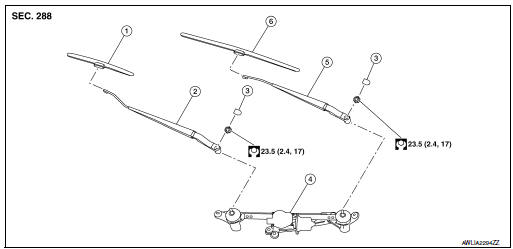
- Front wiper blade (RH)
- Front wiper arm (RH)
- Front wiper arm cover
- Front wiper drive assembly
- Front wiper arm (LH)
- Front wiper blade (LH)
Removal and Installation
REMOVAL
- Move front wiper into the service position by turning the ignition switch ON, then quickly push the wiper washer switch to the mist position two times within 0.5 seconds.
- Turn the ignition switch OFF.
- Remove front wiper arm covers.
- Remove nuts and remove front wiper arms.
INSTALLATION
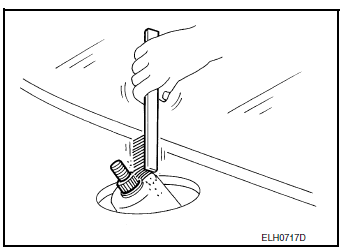
- Clean wiper arm mount as shown in the figure to prevent nuts from being loosened.
- Move front wiper into the service position by turning the ignition switch ON, then quickly push the wiper washer switch to the mist position two times within 0.5 seconds.
- Turn the ignition switch OFF.
- Adjust front wiper blade position. Refer to WW-64, "Adjustment".
- Install front wiper arm by tightening the nuts.
- Install front wiper arm covers.
- Check that the front wiper blades stop at the specified position.
Adjustment
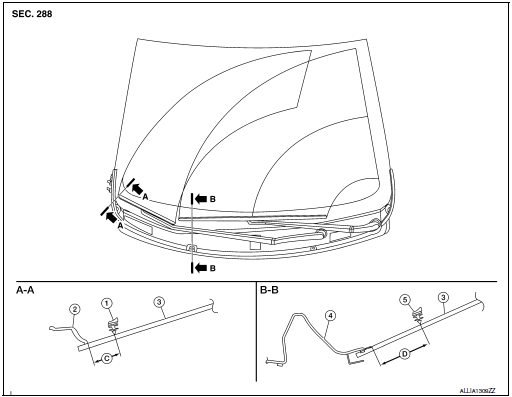
- Wiper blade (RH)
- Front fender (RH)
- Windshield glass
- Cowl top cover
- Wiper blade (LH)
- 34.9 ± 7.5 mm (1.4 ± 0.3 in)
- 38.2 ± 7.5 mm (1.5 ± 0.3 in)
 Front washer nozzle and tube
Exploded View
Cowl top cover
Front washer tube
Front washer nozzle (LH)
Front washer nozzle (RH)
Pawl
Clip
Exploded View
Cowl top cover
Front washer tube
...
 Front wiper blade
Exploded View
Wiper blade (RH)
Wiper arm (RH)
Wiper arm cover
Front wiper drive assembly
Wiper arm (LH)
Wiper blade (LH)
Removal and Installation
REMOVAL
Move front ...
Other materials:
Wiring diagram
CHASSIS CONTROL
Wiring Diagram
...
U1050, U1051 LIN communication
DTC Description
DTC DETECTION LOGIC
DTC No.
CONSULT screen terms
(Trouble diagnosis content)
DTC detecting condition
U1050
LIN COMMUNICATION
[LIN (Local Interconnect Network) communication)]
ECM detects LIN communication error.
U1051
POSSIBLE CAUSE
...
Engine oil
Inspection
ENGINE OIL LEVEL
NOTE:
Before starting engine, put vehicle horizontally and check the engine oil level.
If engine is already started, stop
it and allow 5 minutes before checking.
Pull out oil level gauge and wipe it clean.
Insert oil level gauge and check the engin ...
