
Nissan Rogue Service Manual: Fender protector
FENDER PROTECTOR
FENDER PROTECTOR : Exploded View

- Front fender protector
- Engine side cover
- Front fender
- Over fender
 Clip
Clip
 Front
Front
FENDER PROTECTOR : Removal and Installation
REMOVAL
- Remove wheel and tire using power tool. Refer to WT-60, "Removal and Installation".
- Remove front over fender molding. Refer to EXT-30, "FRONT OVER FENDER : Removal and Installation".
- Remove front under cover. Refer to EXT-16, "Exploded View".
- Remove sill molding screw. Refer to EXT-35, "Exploded View - Center Mudguard".
- Remove engine side cover.
- Release front fender protector clips and remove front fender protector.
INSTALLATION
Installation is in the reverse order of removal.
REAR WHEEL HOUSE PROTECTOR
REAR WHEEL HOUSE PROTECTOR : Exploded View
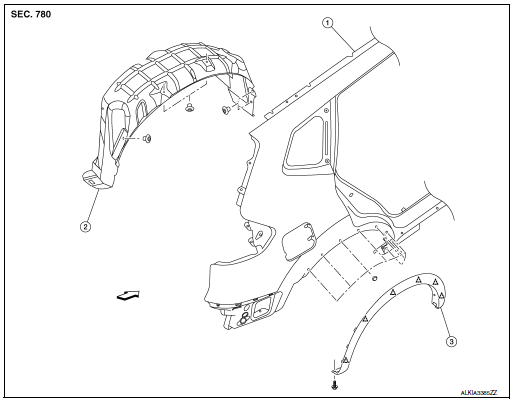
- Rear fender
- Rear wheel house protector
- rear over fender molding
Clip
Front
REAR WHEEL HOUSE PROTECTOR : Removal and Installation
REMOVAL
- Remove rear wheel house protector clip and screws.
- Remove rear wheel house protector nuts and rear wheel house protector.
INSTALLATION
Installation is in the reverse order of removal.
 Cowl top
Exploded View
Cowl top side trim cover (RH)
Cowl top cover screen
Cowl top cover seal
EPT seal
Cowl top cover plug
Cowl top cover
Cowl top cover mask
Cowl top ex ...
 Over fender
FRONT OVER FENDER
FRONT OVER FENDER : Exploded View
Front fender protector
Front fender
Front over fender molding
Clip
FRONT OVER FENDER : Removal and Installation
REM ...
Other materials:
ECU diagnosis information
A/C AUTO AMP.
Reference Value
VALUES ON THE DIAGNOSIS TOOL
TERMINAL LAYOUT
PHYSICAL VALUES
DTC Inspection Priority Chart
If some DTCs are displayed at the same time, perform inspections one by one
based on the following priority
chart.
Priority
Det ...
Hill descent control switch (if so equipped)
Hill descent control switch (if so equipped)
WARNING
Never rely solely on the hill descent
control system to control vehicle speed
when driving on steep downhill grades.
Always drive carefully when using the
hill descent control system and decelerate
the vehic ...
B0001, B0002 driver airbag module
DTC Logic
DTC DETECTION LOGIC
CONSULT name
DTC
DTC detecting condition
Repair order
DRIVER AIRBAG MODULE CIRCUIT
[OPEN]
B0001
Driver air bag module circuit
(DR1) is open
(including the spiral cable).
Refer to SRC-47, "Diagnosis Proced ...
