
Nissan Rogue Service Manual: Door sash molding
Exploded View
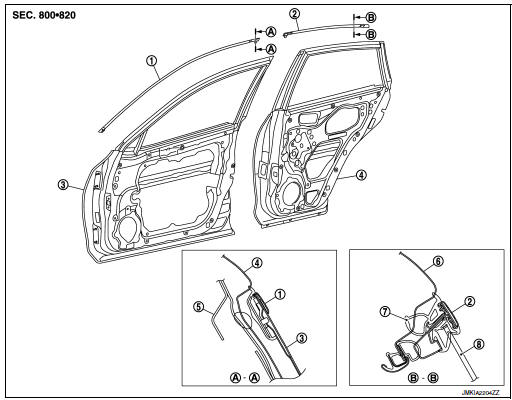
- Front door sash molding
- Rear door rear sash molding
- Front door panel
- Rear door panel
- Roof rail side outer
- Body side outer
- Rear door weather strip
- Rear door glass
Removal and Installation
FRONT DOOR
Removal
- Remove door mirror. Refer to MIR-22, "Removal and Installation".
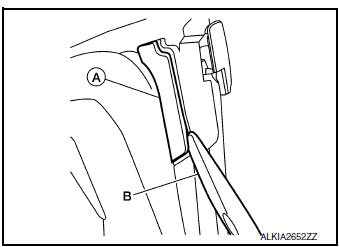
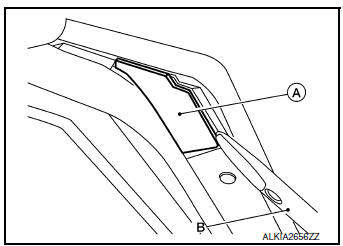
- Remove front door sash molding clip (A) using a suitable tool (B).
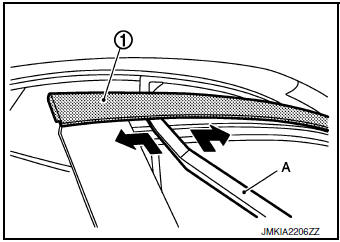
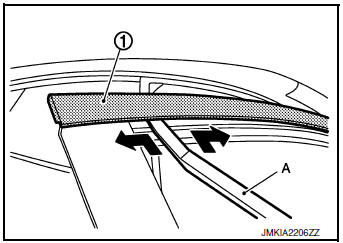
- Using a suitable tool (A) remove front door sash molding (1) as shown and remove.
INSTALLATION
Installation is in the reverse order of removal.
REAR DOOR
Removal
- Remove rear door finisher. Refer to INT-18, "Removal and Installation".
- Remove rear door front sash molding clip (A) using a suitable tool (B).
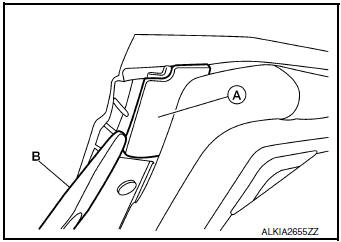
- Remove rear door rear sash molding clip (A) using a suitable
tool (B).
CAUTION: Do not reuse the clip (A).
- Using a suitable tool (A) remove rear door sash molding (1) as shown and remove.
INSTALLATION
Installation is in the reverse order of removal.
 Roof side molding
Exploded View
Roof side molding
Back door hinge cover
Metal clip
Pawl
Removal and Installation
REMOVAL
Release roof side molding (1) using suitable tool (A) then
remove ...
 Door outside molding
Exploded View
Front door panel
Front door outside molding
Rear door panel
Rear door outside molding
Pawl
Removal and Installation
FRONT DOOR OUTSIDE MOLDING
Removal
& ...
Other materials:
Fluid cooler hose
Exploded View
COMPONENT PARTS LOCATION
Transaxle assembly
Fluid cooler hose A
Hose clamp
Fluid cooler hose B
CVT oil warmer
To radiator
: Always replace after every
disassembly.
Removal and Installation
REMOVAL
NOTE:
When removing components such as hoses, tubes/lines, ...
How to use this manual
How to use this manual
Description
This volume explains “Removal, Disassembly, Installation, Inspection and
Adjustment� and “Trouble Diagnoses�.
Terms
The captions WARNING and CAUTION warn you of steps that must be followed
to prevent personal injury
and/or damage to some par ...
Steering column
Inspection
HOLE COVER SEAL, HOLE COVER AND LOWER SHAFT
Check each part of hole cover seal, hole cover and steering column and lower
shaft for damage or other malfunctions.
Replace if necessary.
STEERING COLUMN
Check each part of steering column for damage or other
malfunctions. ...
