
Nissan Rogue Service Manual: Diagnosis system [ABS actuator and electric unit (control unit)]
CONSULT Function
APPLICATION ITEMS
CONSULT can display each diagnostic item using the diagnostic test modes as follows.
|
Mode |
Function description |
| ECU identification | Parts number of ABS actuator and electric unit (control unit) can be read. |
| Self Diagnostic Result | Self-diagnostic results and freeze frame data can be read and erased quickly.* |
| DATA MONITOR | Input/Output data in the ABS actuator and electric unit (control unit) can be read. |
| ACTIVE TEST | Input/Output data in the ABS actuator and electric unit (control unit) can be read. |
| WORK SUPPORT | Components can be quickly and accurately adjusted. |
| Re/programming, Configuration |
|
*: The following diagnosis information is erased by erasing.
- DTC
- Freeze frame data (FFD)
ECU IDENTIFICATION
ABS actuator and electric unit (control unit) part number can be read.
SELF DIAGNOSTIC RESULT
Refer to BRC-55, "DTC Index".
When “CRNT� is displayed on self-diagnosis result,
- The system is presently malfunctioning.
When “PAST� is displayed on self-diagnosis result,
- System malfunction in the past is detected, but the system is presently normal.
Freeze frame data (FFD)
The following vehicle status is recorded when DTC is detected and is displayed on CONSULT.
|
Item name |
Display item |
| IGN counter (0 − 39) | The number of times that ignition switch is turned ON after the DTC
is detected is displayed.
NOTE: Each time when ignition switch is turned OFF to ON, numerical number increases in 1 → 2 → 3...38 → 39. When the operation number of times exceeds 39, the number do not increase and “39� is displayed until self-diagnosis is erased. |
ACTIVE TEST
The active test is used to determine and identify details of a malfunction, based on self-diagnosis test results and data obtained in the DATA MONITOR. In response to instructions from CONSULT, instead of those from ABS actuator and electric unit (control unit) on the vehicle, a drive signal is sent to the actuator to check its operation.
CAUTION:
- Never perform ACTIVE TEST while driving the vehicle.
- Always bleed air from brake system before active test.
- Never perform active test when system is malfunctioning.
NOTE:
- When active test is performed while depressing the pedal, the pedal depressing stroke may change. This is not a malfunction.
- “TEST IS STOPPED� is displayed approx. 10 seconds after operation start.
- When performing active test again after “TEST IS STOPPED� is displayed, select “BACK�.
- ABS warning lamp, brake warning lamp and VDC warning lamp may turn ON during active test. This is not a malfunction.
ABS IN Valve and ABS OUT Valve
When “Up�, “Keep� or “Down� is selected on display screen, the following items are displayed when system is normal.
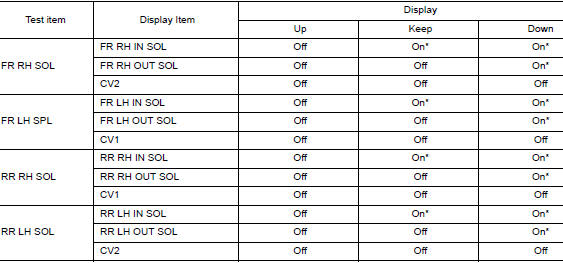
*: Immediately after being selected, status is “On�. Status changes to “Off� after approx. 2 seconds.
ABS IN Valve (ACT) and ABS OUT Valve (ACT)
When “Up�, “ACT UP� or “ACT KEEP� is selected on display screen, the following items are displayed when system is normal.
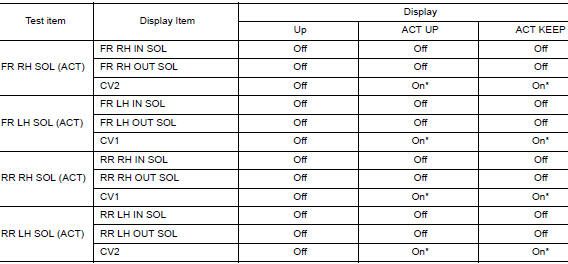
*: Immediately after being selected, status is “On�. Status changes to “Off� after approx. 10 seconds.
ABS MOTOR
When “On� or “Off� is selected on display screen, the following items are displayed when system is normal.
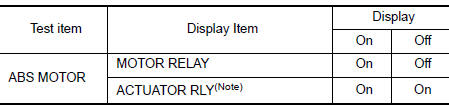
NOTE: Display occasionally changes On/Off for a moment after ignition switch is turned ON. This is operation for checking purposes and is not a malfunction.
DATA MONITOR
NOTE: The following table includes information (items) inapplicable to this vehicle. For information (items) applicable to this vehicle, refer to CONSULT display items.
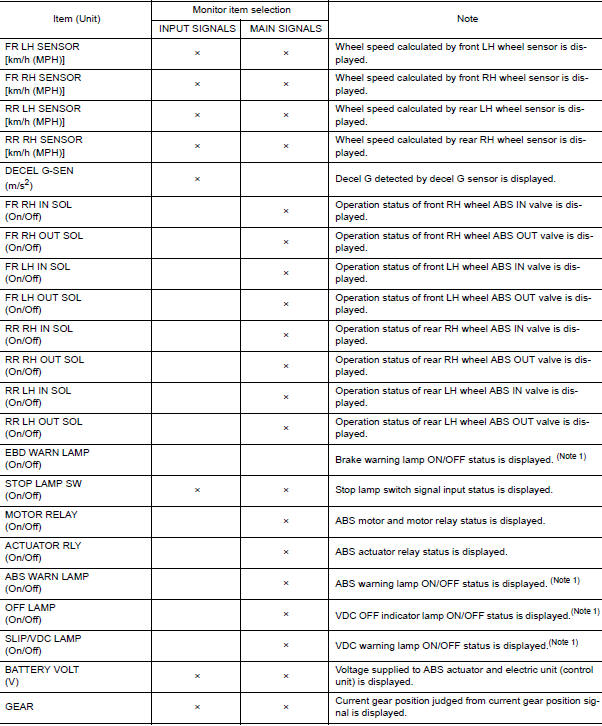
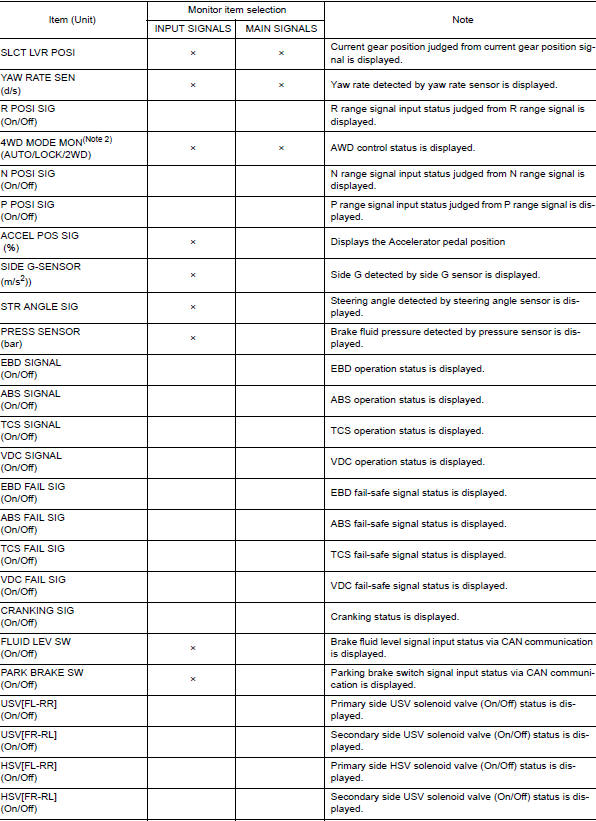
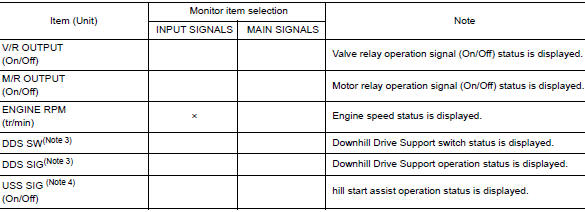
Note 1: Refer to BRC-14, "System Description" for ON/OFF conditions of each
warning lamp and indicator
lamp.
Note 2: AWD models
Note 3: DDS� (Downhill Drive Support)
Note 4: USS (Hill Start Assist)
WORK SUPPORT
|
Conditions |
Description |
| ST ANGLE SENSOR ADJUSTMENT | Perform neutral position adjustment of steering angle sensor |
| DECEL G SEN CALIBRATION | Perform decel G sensor calibration. |
 System
System Description
The system switches fluid pressure of each brake caliper to increase, to
hold or to decrease according to
signals from control unit in ABS actuator and electric unit (contr ...
 ECU diagnosis information
ABS ACTUATOR AND ELECTRIC UNIT (CONTROL UNIT)
Reference Value
CONSULT DATA MONITOR STANDARD VALUE
NOTE:
The following table includes information (items) inapplicable to this vehicle.
For informa ...
Other materials:
Timing chain
Exploded View
Cylinder block
Timing chain slack guide
Chain tensioner
Timing chain
Camshaft sprocket (EXH)
Camshaft sprocket (INT)
Oil filter
Front cover
O-ring
Oil pressure sensor
Valve timing control cover O-rings
...
P0453 EVAP control system pressure sensor
DTC Description
DTC DETECTION LOGIC
DTC No.
CONSULT screen terms
(Trouble diagnosis content)
DTC detecting condition
P0453
EVAP SYS PRES SEN
(Evaporative emission system pressure
sensor/switch high)
An excessively high voltage from the sensor is sent to ECM.
...
Front disc brake
BRAKE PAD
BRAKE PAD : Inspection
Check brake pad wear thickness from an inspection hole (A) on cylinder
body. Check using a scale if necessary.
Wear thickness : Refer to BR-55, "Front Disc Brake".
DISC BRAKE ROTOR
DISC BRAKE ROTOR : Inspection
APPEARANCE
Check surface of disc b ...
