
Nissan Rogue Service Manual: Crash zone sensor
Exploded View
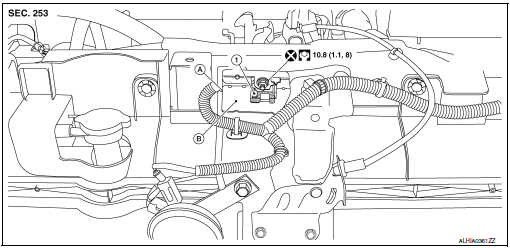
- Crash zone sensor
- Crash zone sensor harness connector
- Bracket
Removal and Installation
WARNING:
- Before servicing the SRS, turn ignition switch OFF, disconnect both battery terminals then wait at least three minutes.
- Do not use air tools or electric tools for servicing.
REMOVAL
- Disconnect negative and positive battery terminals, then wait at least three minutes. Refer to PG-77, "Removal and Installation".
- Remove front grille. Refer to EXT-23, "Removal and Installation".
- Remove crash zone sensor nut.
CAUTION: Do not reuse the crash zone sensor nut.
- Disconnect crash zone sensor harness connector, and remove crash zone sensor and bracket.
CAUTION:
- Replace the crash zone sensor if it has been dropped or sustained an impact.
- Do not strike the crash zone sensor.
- Replace the crash zone sensor if either the driver air bag or the front passenger air bag has been deployed.
INSTALLATION
Installation is in the reverse order of removal.
CAUTION:
- Do not reuse the crash zone sensor nut.
- Do not damage the harness connector during installation.
- After installation is complete, check that no system malfunction is detected causing the air bag warning lamp to illuminate.
- If a malfunction is indicated by the air bag warning lamp after repair or replacement of the malfunctioning parts, perform the SRS final check. Refer to SRC-18, "Trouble Diagnosis with CONSULT".
 Side curtain air bag module
Exploded View
Side curtain air bag module
Fron
Removal and Installation
WARNING:
Before servicing the SRS, turn ignition switch OFF, disconnect
both battery terminals then ...
 Side air bag (satellite) sensor
Exploded View
Front door satellite sensor
Front side air bag satellite sensor
Rear side satellite sensor
Satellite sensor harness connector
Bolt
Nut
Pawl ...
Other materials:
Operation
Switch Name and Function
STEERING SWITCH
No.
Switch name
Operation
Description
1
Enter/Up/Down switch
Press
The information display settings can be changed.
2
Display switch
3
Back switch
METER CONTROL SWITCH
No.
Sw ...
Engine coolant
Inspection
LEVEL
Check that the reservoir tank engine coolant level is within the
“MIN� to “MAX� when the engine is cool.
(A) : MAX
(B) : MIN
Adjust the engine coolant level if necessary.
CAUTION:
Refill Genuine NISSAN Long Life Antifreeze/Coolant (blue) or
equiva ...
Anti-pinch system does not operate normally (driver side)
Diagnosis Procedure
1.PERFORM INITIALIZATION PROCEDURE
Initialization procedure is executed and operation is confirmed.
Refer to PWC-27, "ADDITIONAL SERVICE WHEN REMOVING BATTERY NEGATIVE TERMINAL :
Special
Repair Requirement".
Is the inspection result normal?
YES >> Insp ...
