
Nissan Rogue Service Manual: Component parts
MOONROOF
MOONROOF : Component Parts Location
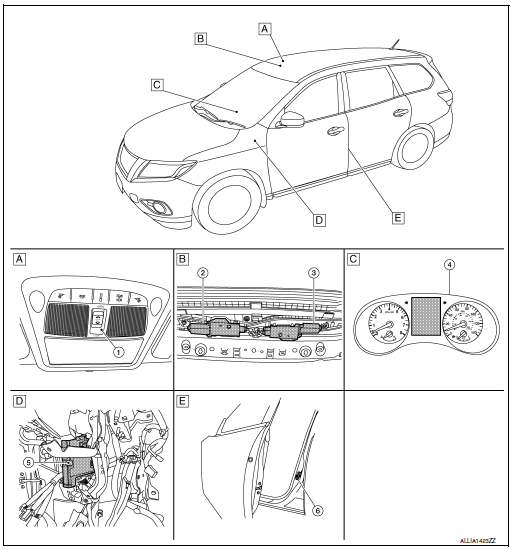
- Moonroof switch
- View with headliner removed
- Combination meter
- Behind instrument panel (LH)
- View with LH door open (RH similiar)
MOONROOF : Component Description
|
No |
Component |
Function |
| 1 | Moonroof switch | Transmits open/close operation signal to the moonroof and sunshade motor assembly. |
| 2 | Sunshade motor | The sunshade motor and CPU are integrated into one unit that opens/closes by input from the moonroof switch operation. |
| 3 | Moonroof motor | The moonroof motor and CPU are integrated into one unit that opens/closes by input from the moonroof switch operation. |
| 4 | Combination meter | Transmits the vehicle speed signal to BCM via CAN communication. |
| 5 | BCM | Supplies the power supply to the moonroof & sunshade motor assembly. |
| 6 | Front door switch LH | Detects door open/close condition and transmits to BCM. |

 System
MOONROOF
MOONROOF : System Diagram
MOONROOF & SUNSHADE
MOONROOF : System Description
MOONROOF SYSTEM
INPUT/OUTPUT SIGNAL CHART
Item
Input signal to moonroof motor assem ...
Other materials:
Recommended fluids and lubricants
Fluids and Lubricants
*1: For additional information, see “Engine Oil Recommendation�.
*2: As an alternative to this recommended oil, SAE 5W-30 conventional petroleum
based oil may be used and meet all specifications
and requirements necessary to maintain the New Vehicle Limited Warra ...
B0001, B0002 driver airbag module
DTC Logic
DTC DETECTION LOGIC
CONSULT name
DTC
DTC detecting condition
Repair order
DRIVER AIRBAG MODULE CIRCUIT
[OPEN]
B0001
Driver air bag module circuit
(DR1) is open
(including the spiral cable).
Refer to SRC-47, "Diagnosis Proced ...
C1730, C1731, C1732, C1733 flat tire
DTC Logic
NOTE:
The Signal Tech II Tool [- (J-50190)] can be used to perform the following
functions. Refer to the Signal Tech II
User Guide for additional information.
Activate and display TPMS sensor IDs
Display tire pressure reported by the TPMS sensor
Read TPMS DTC ...
