
Nissan Rogue Service Manual: Moonroof motor assembly
Exploded View
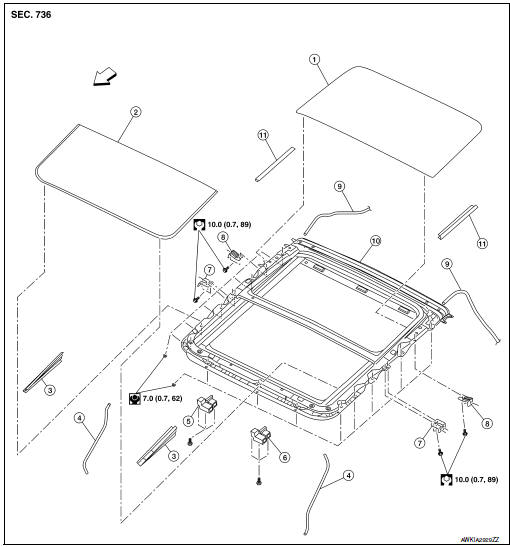
- Panoramic roof glass
- Glass lid
- Side trim covers (LH/RH)
- Front drain hose front (LH/RH)
- Moonroof motor assembly
- Sunshade motor assembly
- Moonroof front bracket (LH/RH)
- Moonroof rear bracket (LH/RH)
- Drain hose rear (LH/RH)
- Moonroof unit assembly
- Rear trim (LH/RH)
 Front
Front
Removal and Installation
REMOVAL
- Close glass lid.
- Remove the headlining. Refer to INT-30, "Removal and Installation".
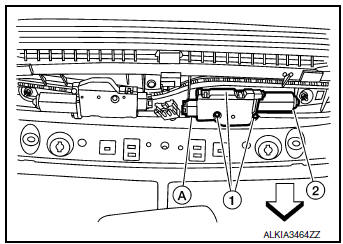
- Remove moonroof motor assembly screws (1).Front
- Disconnect harness connector (A) and remove moonroof motor
assembly (2) from moonroof unit assembly front end rail.
CAUTION: Do not run the removed moonroof motor assembly as a single unit.
INSTALLATION
- Move moonroof motor assembly laterally little by little so that the
gear is completely engaged into the wire
on the moonroof unit assembly, and the mounting surfaces become parallel.
Install the moonroof motor
assembly screws and tighten.
CAUTION: Before installing the motor, be sure to place the link and wire assembly in the symmetrical and fully closed position.
NOTE: If necessary, insert a suitable tool into the drive key and rotate right or left slightly to assist in complete moonroof motor gear alignment.
- Remainder of installation is in the reverse order of removal.
- Synchronize moonroof motor assembly with moonroof unit assembly. Refer to RF-24, "ADDITIONAL SERVICE WHEN REPLACING CONTROL UNIT : Special Repair Requirement".
 Panoramic roof glass
Exploded View
Panoramic roof glass
Glass lid
Side trim covers (LH/RH)
Front drain hose (LH/RH)
Moonroof motor assembly
Sunshade motor assembly
Moonroof front bracke ...
 Moonroof unit assembly
Inspection
WIND DEFLECTOR
Open glass lid fully.
Visually check for proper installation, damaged/deteriorated components,
or foreign objects within mechanism.
Correct as required for smooth ...
Other materials:
System description
COMPONENT PARTS
POWER DOOR LOCK SYSTEM
POWER DOOR LOCK SYSTEM : Component Parts Location
No
Component
Function
1
BCM
Controls the door lock system.
Refer to BCS-7, "BODY CONTROL SYSTEM : Component Parts Location" for
detailed
install ...
Towing recommended by NISSAN
All-Wheel Drive (AWD) models
NISSAN recommends that towing dollies be
used when towing your vehicle or the vehicle be
placed on a flatbed truck as illustrated.
CAUTIONDO NOT tow AWD models with any of the
wheels on the ground as this may cause
serious and expensive damage to the ...
P0717 input speed sensor A
DTC Description
DTC DETECTION LOGIC
DTC
CONSULT screen terms
(Trouble diagnosis content)
DTC detection condition
P0717
INPUT SPEED SENSOR A
(Input/Turbine Speed Sensor “A� Circuit No
Signal)
When 1 is satisfied and any of 2, 3 or 4 is satisfied:
W ...
