
Nissan Rogue Service Manual: System
MOONROOF
MOONROOF : System Diagram
MOONROOF & SUNSHADE
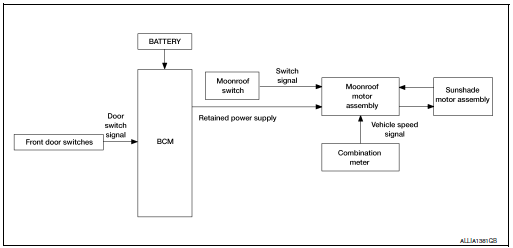
MOONROOF : System Description
MOONROOF SYSTEM
INPUT/OUTPUT SIGNAL CHART
|
Item |
Input signal to moonroof motor assembly |
Moonroof motor function |
Actuator |
| Moonroof switch | Moonroof signal (tilt up/down or slide open/close) | Receives signal and moves the moonroof and sunshade assembly to the correct position. | Moonroof motor and/or Sunshade motor |
| Sunshade signal (slide open/close) | |||
| Combination meter | Sunshade signal (slide open/close) | Receives speed signal and determines the amount of torque the motor requires. | |
| BCM | RAP signal | Retained power after the key is turned off and the front doors stay closed. |
MOONROOF AND SUNSHADE OPERATION
- Moonroof motor and sunshade motor assembly operates with the power supply that is output from the BCM while the ignition switch is ON or retained power is operating.
- Tilt up/down & slide open/close signals from the moonroof switch enable the moonroof motor and sunshade motor to move.
- Moonroof motor assembly receives a vehicle speed signal from the combination meter and controls the moonroof motor torque of tilt down at the time of high speed operation.
AUTO OPERATION
Moonroof and Sunshade AUTO feature makes it possible to slide open and slide closed the moonroof and sunshade without holding the moonroof switch in the slide open/close position.
RETAINED POWER OPERATION
- Retained power operation is an additional power supply function that enables the moonroof and sunshade system to operate for 45 seconds after the ignition switch is turned off and the front doors remain closed.
Retained power function cancel conditions
- Door CLOSE (door switch OFF)→OPEN (door switch ON).
- When ignition switch is ON again.
- When timer time passes (45 seconds).
ANTI-PINCH FUNCTION
The moonroof and sunshade motor’s built in CPU monitors the moonroof motor and sunshade motor operation and position.
If a restriction is detected during the slide closed operation the moonroof/sunshade motor will move the glass/ sunshade in the open positions.
 Component parts
MOONROOF
MOONROOF : Component Parts Location
Moonroof switch
View with headliner removed
Combination meter
Behind instrument panel (LH)
View with LH door open (RH similiar)
MOONROO ...
 Diagnosis system (BCM) (with intelligent key system)
COMMON ITEM
COMMON ITEM : CONSULT Function (BCM - COMMON ITEM)
APPLICATION ITEM
CONSULT performs the following functions via CAN communication with BCM.
Direct Diagnostic Mode
De ...
Other materials:
The seat belt reminder warning continues sounding, or
does not sound
Description
Seat belt warning does not sound even though driver seat belt is not
fastened.
Seat belt warning sounds even though driver seat belt is fastened.
Diagnosis Procedure
1.CHECK WARNING CHIME OPERATION
Select "BUZZER" of "BCM" on "CONSULT" ...
Sun visors
Sun visors
To block glare from the front, swing down the
main sun visor.
To block glare from the side, remove the
main sun visor from the center mount and
swing the visor to the side.
To extend the sun visor, slide in or out as
needed.
CAUTION
Do not ...
How to use this manual
How to use this manual
Description
This volume explains “Removal, Disassembly, Installation, Inspection and
Adjustment� and “Trouble Diagnoses�.
Terms
The captions WARNING and CAUTION warn you of steps that must be followed
to prevent personal injury
and/or damage to some par ...
