
Nissan Rogue Service Manual: Center console assembly
Exploded View
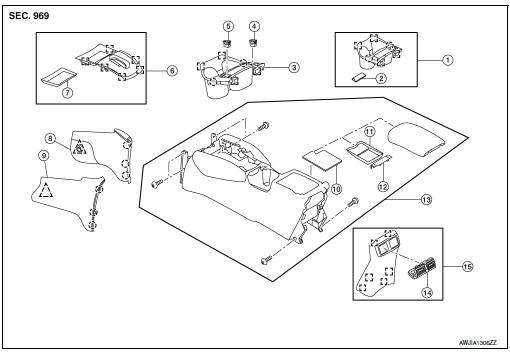
- Center console cup holder (without heated seats)
- Coin tray insert
- Center console cup holder (with heated seats)
- Front heated seat switch (RH)
- Front heated seat switch (LH)
- Shift selector finisher
- Shift selector finisher mat
- Center console side finisher (RH)
- Center console side finisher (LH)
- Center console tray
- Center console bin mat
- Center console rear brace finisher
- Center console assembly
- Rear center ventilator grille
- Center console rear finisher
 Metal clip
 Clip
Clip
 Pawl
Pawl
Removal and Installation
REMOVAL
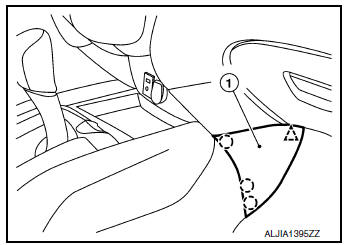
- Release clips and pawls using a suitable tool and remove center console side finisher (1) (LH/RH).
: Pawl
: Clip
NOTE: RH side shown; LH similar.
- Remove shift selector knob. Refer to TM-194, "Exploded View".
- Remove cluster lid C. Refer to IP-21, "Removal and Installation".
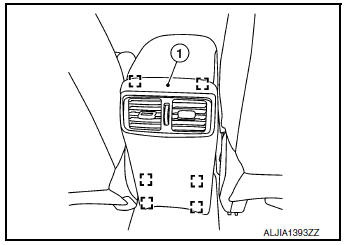
- Release clips using a suitable tool and remove center console
rear finisher (1).: Metal clip
- Remove center console screws (A).
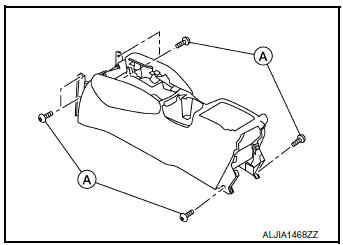
- Disconnect the harness connectors and remove center console.
INSTALLATION
Installation is in the reverse order of removal.
 Steering column covers
Removal and Installation
REMOVAL
Release gap hider (1) pawls from the steering column upper
cover (2).
: Pawl
Remove steering column cover screws (A)
NOTE:
Rotate steering w ...
 Cluster lid A
Removal and Installation
REMOVAL
Remove instrument lower panel LH. Refer to IP-22, "Removal and
Installation".
Remove instrument finisher A. Refer to IP-15, "INSTR ...
Other materials:
Voice commands
Voice commands can be used to operate the
Bluetooth® Hands-Free Phone System. Press
the button and say “Phone� to
bring up the
phone command menu. The available options
are:
Call
Phonebook
Recent Calls
Messaging (if available)
Show Applications ( ...
P155D generator
DTC Description
DTC DETECTION LOGIC
DTC No.
CONSULT screen terms
(Trouble diagnosis content)
DTC detecting condition
P155D
GENERATOR
(Generator)
ECM receives mechanical malfunction signal sent from generator.
ECM receives electrical malfunction ...
Door mirror glass
Removal and Installation
REMOVAL
Release the metal clips and pawls that retain the door mirror
glass using a suitable tool, disconnect the harness connectors
(A) (if equipped) from the door mirror glass and remove.
Metal clip
: Pawl
INSTALLATION
Installation is in the rever ...
