
Nissan Rogue Service Manual: Brake pedal
Exploded View
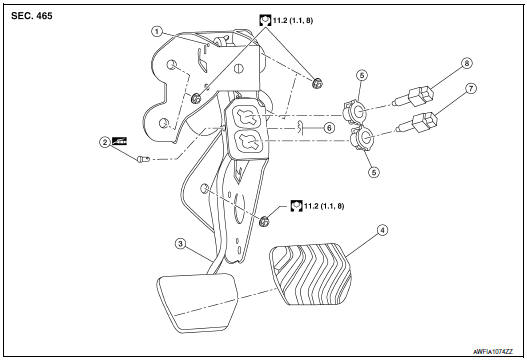
- Rivet
- Clevis pin
- Brake pedal
- Brake pedal pad
- Clip
- Snap pin
- Stop lamp switch
- Brake pedal position switch
Removal and Installation
REMOVAL
- Remove instrument lower panel LH. Refer to IP-22, "Removal and Installation".
- Remove the knee protector. Refer to IP-14, "Exploded View".
- Remove snap pin and clevis pin from clevis of brake booster.
- Disconnect the harness connectors from the stop lamp switch and brake pedal position switch.
- Remove the accelerator pedal. Refer to ACC-3, "Removal and Installation".
- Remove the brake pedal.
CAUTION: Support the brake booster and master cylinder to prevent contact with other components.
INSPECTION AFTER REMOVAL
- Check the following items and replace the brake pedal assembly if necessary.
- Check the brake pedal rivet for deformation or damage.
- Check the brake pedal for bend, damage, and cracks on the welded parts.
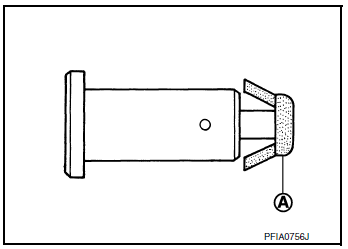
- Check clevis pin and plastic stopper (A) for damage and deformation.
If any damage is found, replace clevis pin.
INSTALLATION
Installation is in the reverse order of removal.
CAUTION: Replace the brake pedal if it has been dropped or sustained an impact.
- Check that the brake pedal height and brake pedal play meet the specifications by checking the brake pedal and brake booster for damage and replace parts as necessary. Refer to BR-54, "Brake Pedal".

 Brake piping
FRONT
FRONT : Exploded View
Master cylinder secondary to
ABS actuator brake tube
Master cylinder primary to
ABS actuator brake tube
Brake tube bracket
Brake tube (LH)
Brake ...
Other materials:
Removal and installation
AWD CONTROL UNIT
Exploded View
1 AWD control unit
: Vehicle front
: N·m (kg-m, in-lb)
Removal and Installation
REMOVAL
Remove luggage side lower finisher (LH). Refer to INT-33,
"Exploded View".
Disconnect AWD control unit harness connector.
Remove AWD ...
Additional service when replacing ECM
Description
When replacing ECM, the following procedure must be performed. (For details,
refer to EC-136, "Work Procedure".)
PROGRAMMING OPERATION
NOTE:
After replacing with a blank ECM, programming is required to write ECM
information. Be sure to follow the procedure
to perform t ...
Active engine brake
The Active Engine Brake function adds subtle
deceleration by controlling CVT gear ratio, depending
on the cornering condition calculated
from driver’s steering input and plural sensors.
This benefit is for easier traceability and less
workload of adjusting speed with braking at corners.
...
