
Nissan Rogue Service Manual: Brake booster
Inspection
Operation
Depress the brake pedal several times at five second intervals with the engine stopped. Start the engine with the brake pedal fully depressed. Check that the clearance between brake pedal and dash lower panel decreases.
NOTE: A slight impact with a small click may be felt on the pedal when the brake pedal is fully depressed. This is normal brake system operation.
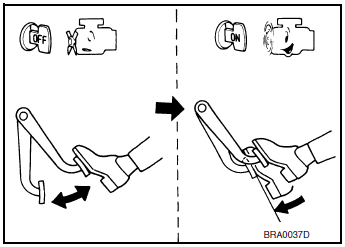
Vacuum Inspection
Idle the engine for one minute to apply vacuum to the brake booster.
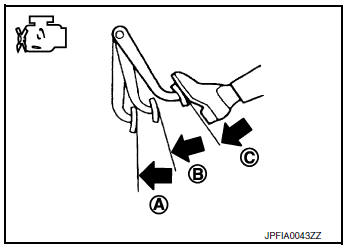
Stop the engine. Depress the brake pedal several times at five second intervals until the accumulated vacuum is released to atmospheric pressure. Check that the clearance between brake pedal and dash lower panel gradually increases (A → B → C) each time the brake pedal is depressed during this operation.
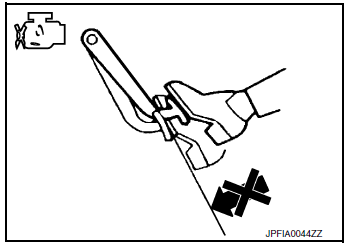
Depress the brake pedal with the engine running. Then stop the engine while holding down the brake pedal. Check that the brake pedal stroke does not change after holding down the brake pedal for 30 seconds or more.
NOTE: A slight impact with a small click may be felt on the pedal when the brake pedal is fully depressed. This is normal brake system operation.
 Brake master cylinder
Inspection
Check for brake fluid leakage at the following areas:
Master cylinder mounting face
Reservoir tank mounting face
Brake tube and brake tube connections
Bra ...
 Front disc brake
BRAKE PAD
BRAKE PAD : Inspection
Check brake pad wear thickness from an inspection hole (A) on cylinder
body. Check using a scale if necessary.
Wear thickness : Refer to BR-55, "Front Dis ...
Other materials:
Diagnosis system (BCM) (with intelligent key system)
COMMON ITEM
COMMON ITEM : CONSULT Function (BCM - COMMON ITEM)
APPLICATION ITEM
CONSULT performs the following functions via CAN communication with BCM.
Direct Diagnostic Mode
Description
Ecu Identification
The BCM part number is displayed.
Self Diagnostic ...
Precaution
Precaution for Supplemental Restraint System (SRS) "AIR BAG" and "SEAT
BELT
PRE-TENSIONER"
The Supplemental Restraint System such as “AIR BAG� and “SEAT BELT PRE-TENSIONER�,
used along
with a front seat belt, helps to reduce the risk or severity of injury to the
...
Washer tank
Exploded View
Cap
Washer tank
Washer tank inlet
Clip
Removal and Installation
REMOVAL
Drain washer fluid.
Using a suitable tool release washer tank inlet clip and remove
washer tank inlet.
Remove engine side cover. Refer EXT-28, "FEND ...
