
Nissan Rogue Owners Manual: How to read the displayed lines
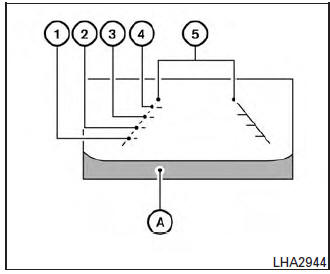
Guiding lines which indicate the vehicle width and distances to objects with reference to the vehicle body line A are displayed on the monitor.
Distance guide lines:
Indicate distances from the vehicle body.
- Red line 1 : approx. 0.5 m (1.5 ft)
- Yellow line 2 : approx. 1 m (3 ft)
- Green line 3 : approx. 2 m (7 ft)
- Green line 4 : approx. 3 m (10 ft)
- Vehicle width guide lines 5 :
Indicate the vehicle width when backing up.
 RearView Monitor (if so equipped)
When the shift lever is shifted into the R (Reverse)
position, the monitor display shows the
view to the rear of the vehicle.
WARNINGFailure to follow the warnings and instructions
for pr ...
 Adjusting the screen
The procedure for adjusting the quality of the
screen differs depending on the type of screen
present on the vehicle.
For vehicles without Navigation System:
Press the ENTER/SETTING ...
Other materials:
Unit removal and installationEMBER
REAR SUSPENSION M
Exploded View
Rear suspension member
Suspension member stay
(RH)
Suspension member stay (LH)
Bound bumper
Front
Removal and Installation - FWD
REMOVAL
Remove wheel and tires using power tool. Refer to WT-60, "Exploded
Vie ...
Component parts
METER SYSTEM
METER SYSTEM : Component Parts Location
Vehicle front
View of the fuel pump and fuel level
sensor inspection hole covers with
the rear seat removed.
View of front engine assembly
No.
Component
Function
1
Combination me ...
ECU diagnosis information
FRONT AIR CONTROL
Reference Value
TERMINAL LAYOUT
PHYSICAL VALUES
DTC Inspection Priority Chart
If some DTCs are displayed at the same time, perform inspections one by one
based on the following priority
chart.
Priority
Detected items (DTC)
1
...
