
Nissan Rogue Owners Manual: Bluetooth® streaming audio without Navigation System (if so equipped)
If you have a compatible Bluetooth® audio device that is capable of playing audio files, the device can be connected to the vehicle’s audio system so that the audio files on the device play through the vehicle’s speakers.
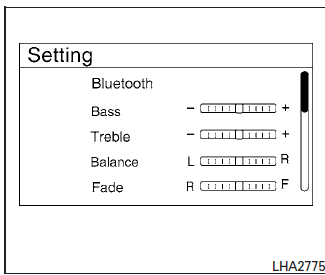
Connecting Bluetooth® audio
To connect your Bluetooth® audio device to the vehicle, follow the procedure below:
- Press the ENTER/SETTING button.
- Select the “Bluetooth� key.
- Select the “Add Phone or Device� key. This same screen can be accessed to remove, replace or select a different Bluetooth® device.
- The system acknowledges the command and asks you to initiate connecting from the phone handset. The connecting procedure of the cellular phone varies according to each cellular phone model. For additional information, refer to the cellular phone Owner’s Manual for details. You can also visit www.nissanusa.com/bluetooth or www.nissan.ca.com/bluetooth for instructions on connecting NISSAN recommended cellular phones.
Audio main operation
To switch to the Bluetooth® audio mode, press the MEDIA button repeatedly until the Bluetooth® audio mode is displayed on the screen.
The controls for the Bluetooth® audio are displayed on the screen. Use the Preset 3 button for play and the Preset 4 button for pause.
 iPod®* player operation with Navigation System (if so equipped)
iPod®* player operation with Navigation System
Connecting iPod®
WARNINGDo not connect, disconnect, or operate the
USB device while driving. Doing so can be
a distraction. If dist ...
 Bluetooth® streaming audio with Navigation
System
Bluetooth® streaming audio with Navigation
System
If you have a compatible Bluetooth® audio device
that is capable of playing audio files, the
device can be connected to the vehicle’s audio
system so that the audio files on the device play
thr ...
Other materials:
Front seat
Exploded View
DRIVER POWER SEAT
Headrest
Seatback support
Seatback board
Seatback heater (if equipped)
Seatback trim
Seatback pad
Seat cushion outer finisher (RH)
Seat cushion rear finisher
(RH)
Seat cushion inner finisher (RH)
Seat sli ...
Steering column covers
Removal and Installation
REMOVAL
Release gap hider (1) pawls from the steering column upper
cover (2).
: Pawl
Remove steering column cover screws (A)
NOTE:
Rotate steering wheel to access steering column cover screws.
Release steering column upper cover (1) pawls u ...
Maintenance requirements
Your NISSAN is designed to have minimum maintenance
requirements with long service intervals
to save you both time and money. However, some
day-to-day and regular maintenance is essential
to maintain your NISSAN’s good mechanical
condition, as well as its emissions and engine
performance.
...
