
Nissan Rogue Owners Manual: Bluetooth® streaming audio with Navigation System
If you have a compatible Bluetooth® audio device that is capable of playing audio files, the device can be connected to the vehicle’s audio system so that the audio files on the device play through the vehicle’s speakers.
Connecting Bluetooth® audio
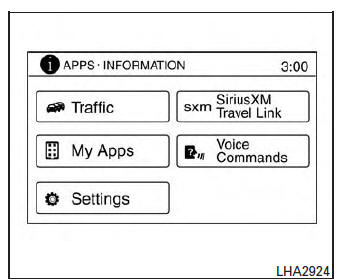
To connect your Bluetooth® audio device to the vehicle, follow the procedure below:
- Press the [
 ] button.
 - Touch the “Settings� key.
- Touch the “Phone & Bluetooth� key.
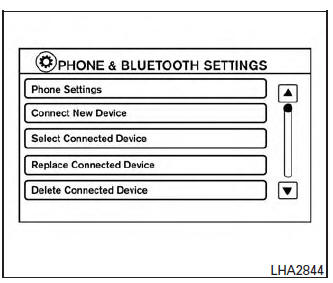
- Touch the “Connect New Device� key.
- The system acknowledges the command and asks you to initiate connecting from the phone handset. The connecting procedure of the cellular phone varies according to each cellular phone model. For additional information, refer to the cellular phone Owner’s Manual for details. You can also visit www.nissanusa.com/bluetooth or www.nissan.ca.com/bluetooth for instructions on connecting NISSAN recommended cellular phones.
Audio main operation
To switch to the Bluetooth® audio mode, press the AUX button repeatedly until the Bluetooth® audio mode is displayed on the screen.
The controls for the Bluetooth® audio are displayed on the screen.
 Bluetooth® streaming audio without
Navigation System (if so equipped)
Bluetooth® streaming audio without
Navigation System (if so equipped)
If you have a compatible Bluetooth® audio device
that is capable of playing audio files, the
device can be connected to the vehicle’s audio
system so that the audio files on the device play
thr ...
 CD care and cleaning
Handle a CD by its edges. Do not bend the
disc. Never touch the surface of the disc.
Always place the discs in the storage case
when they are not being used.
To clean a disc ...
Other materials:
Oil pan and oil strainer
Exploded View
Oil pan, upper
Oil filter
Front cover
O-ring
Oil strainer
Oil pan, lower
Washer
Drain plug
O-ring
Oil level gauge guide
Oil level gauge
Rear cover plate
To Oil pan, lower
Removal and In ...
FM/AM radio with compact disc (CD) player
(if so equipped)
FM/AM radio with compact disc (CD) player
CD eject button
CD button
Display screen
CD insert slot
SEEK button
SCAN button
TRACK button
BACK button
iPod MENU button
TUNE/FOLDER knob, ENTER/SETTING
button
Sta ...
Mirrors
Rearview mirror (if so equipped)
Rearview mirror (if so equipped)
Use the night position 1 to reduce glare from
the headlights of vehicles behind you at night.
Use the day position 2 when driving in daylight
hours.
WARNINGUse the night position only when necessary,
because it r ...
