
Nissan Rogue Owners Manual: Bluetooth® Hands-Free Phone System with Navigation System (if so equipped)
WARNING
|
| CAUTION To avoid discharging the vehicle battery, use a phone after starting the engine. |
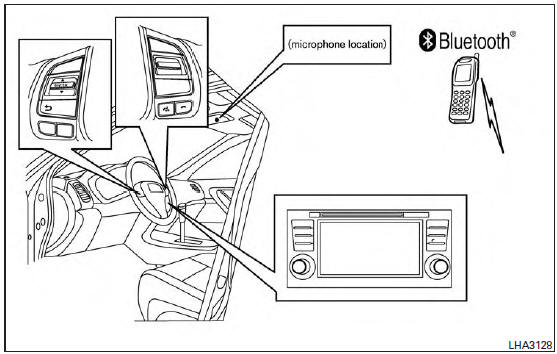
Bluetooth® Hands-Free Phone System with Navigation System
Your NISSAN is equipped with the Bluetooth® Hands-Free Phone System. If you have a compatible Bluetooth® enabled cellular phone, you can set up the wireless connection between your cellular phone and the in-vehicle phone module.
With Bluetooth® wireless technology, you can make or receive a hands-free telephone call with your cellular phone in the vehicle.
Once your cellular phone is connected to the in-vehicle phone module, no other phone connecting procedure is required. Your phone is automatically reconnected with the in-vehicle phone module when the ignition switch is placed in the ON position with the connected cellular phone turned on and carried in the vehicle.
You can register up to five different Bluetooth® cellular phones to the in-vehicle phone module.
However, you can talk on only one cellular phone at a time.
NISSAN Voice Recognition system supports the phone commands, so dialing a phone number using your voice is possible. For additional information, refer to “NISSAN Voice Recognition System� in this section.
Before using the Bluetooth® Hands-Free Phone System, refer to the following notes.
- Set up the wireless connection between a cellular phone and the in-vehicle phone module before using the hands-free phone system.
- Some Bluetooth® enabled cellular phones may not be recognized by the in-vehicle phone module. Please visit www.nissanusa.com/bluetooth for a recommended phone list and connecting.
- You will not be able to use a hands-free phone under the following conditions:
- Your vehicle is outside of the cellular service area.
- Your vehicle is in an area where it is difficult to receive cellular signal; such as in a tunnel, in an underground parking garage, near a tall building or in a mountainous area.
- Your cellular phone is locked to prevent it from being dialed.
- When the radio wave condition is not ideal or ambient sound is too loud, it may be difficult to hear the other person’s voice during a call.
- Immediately after the ignition switch is placed in the ON position, it may be impossible to receive a call for a short period of time.
- Do not place the cellular phone in an area surrounded by metal or far away from the in-vehicle phone module to prevent tone quality degradation and wireless connection disruption.
- While a cellular phone is connected through the Bluetooth® wireless connection, the battery power of the cellular phone may discharge quicker than usual. The Bluetooth® Hands-Free Phone System cannot charge cellular phones.
- If the hands-free phone system seems to be malfunctioning, refer to “Troubleshooting guide� in this section. You can also visit www.nissanusa.com/bluetooth for troubleshooting help.
- Some cellular phones or other devices may cause interference or a buzzing noise to come from the audio system speakers. Storing the device in a different location may reduce or eliminate the noise.
- Refer to the cellular phone owner’s manual regarding the telephone charges, cellular phone antenna and body, etc.
- The signal strength display on the monitor will not coincide with the signal strength display of some cellular phones.
- Regulatory Information
- Voice commands
- Connecting Procedure
- Vehicle phonebook
- Text messaging
- Phone settings
- Bluetooth® settings
 Manual control
While using the Voice Recognition system, it is
possible to select menu options by using the
steering wheel controls instead of speaking voice
commands. To activate manual control mode,
press ...
 Regulatory Information
FCC Regulatory information
CAUTION: To maintain compliance with
FCC’s RF exposure guidelines, use only the
supplied antenna. Unauthorized antenna,
modification, or attachments could ...
Other materials:
P0500 VSS
Description
ECM receives vehicle speed signals from two different paths via CAN
communication line: One is from the
ABS actuator and electric unit (control unit) via the combination unit and the
other is from TCM.
DTC Description
DTC DETECTION LOGIC
DTC No.
CONSULT screen terms
...
Removal and installation
AV CONTROL UNIT
Exploded View
AV control unit bracket (LH)
AV control unit
AV control unit bracket (RH)
Removal and Installation
REMOVAL
CAUTION:
Before disconnecting the AV control unit and battery terminals,
turn the ignition switch OFF and wait
at least 30 secon ...
FM/AM/SAT radio with compact disc (CD) player (Type A) (if so equipped)
FM/AM/SAT radio with compact disc (CD) player (Type A)
CD eject button
XM button*
Display screen
CD insert slot
SEEK button
SCAN button
CAT button
BACK button
APPS button
ENTER/SETTING button/ TUNE/SCROLL
knob
&n ...
