
Nissan Rogue Owners Manual: Bluetooth® settings
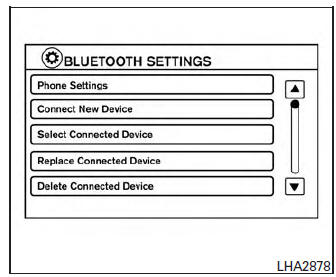
Bluetooth® settings
To access the phone settings:
- Press the [
 ] button.
 - Touch the “Settings� key.
- Touch the “Phone & Bluetooth� key.
| Menu Item | Result |
| Phone Settings | For additional information, refer to “Phone settings� in this section. |
| Connect New Device | Touch to connect a new Bluetooth® device to the Bluetooth® Hands-Free Phone System. |
| Select Connected Device | Touch to choose a Bluetooth® device from a list of those devices connected to the Bluetooth® Hands-Free Phone System. |
| Replace Connected Device | Touch to replace a Bluetooth® device from a list of those devices connected to the Bluetooth® Hands-Free Phone System. |
| Delete Connected Device | Touch to delete a Bluetooth® device from a list of those devices connected to the Bluetooth® Hands-Free Phone System. |
| Bluetooth | Touch to toggle Bluetooth® on and off. |
 Phone settings
To access the phone settings:
Press the [ ] button.
Touch the “Settings� key.
Touch the “Phone & Bluetooth� key.
. Touch the “Phone Settings� key and adjust ...
 NISSAN Voice Recognition System
(if so equipped)
NISSAN Voice Recognition System
(if so equipped)
The NISSAN Voice Recognition system allows
hands-free operation of the systems equipped on
this vehicle, such as the phone and navigation
systems.
To operate NISSAN Voice Recognition, press
the ...
Other materials:
Second row seat belt
Exploded View
Seat belt retractor (center)
Seat belt D-ring bracket (LH/
RH)
Seat belt hook (LH/RH)
Seat belt retractor (RH)
Seat belt D-ring bolt cover
(LH/RH)
Seat belt buckle (RH)
Seat belt buckle (center)
Seat belt buckle (LH)
Seat belt retractor (LH)
&nbs ...
P0713 transmission fluid temperature sensor A
DTC Description
DTC DETECTION LOGIC
DTC
CONSULT screen terms
(Trouble diagnosis content)
DTC detection condition
P0713
FLUID TEMP SENSOR A
(Transmission Fluid Temperature Sensor A Circuit
High)
When all of the following conditions are satisfied and this state i ...
P0327, P0328 KS
DTC Description
DTC DETECTION LOGIC
DTC No.
CONSULT screen terms
(Trouble diagnosis content)
DTC detecting condition
P0327
KNOCK SEN/CIRC-B1
(Knock sensor 1 circuit low bank 1 or single
sensor)
An excessively low voltage from the knock sensor is sent to ECM.
...
