
Nissan Rogue Service Manual: Basic inspection
DIAGNOSIS AND REPAIR WORK FLOW
Work Flow
OVERALL SEQUENCE
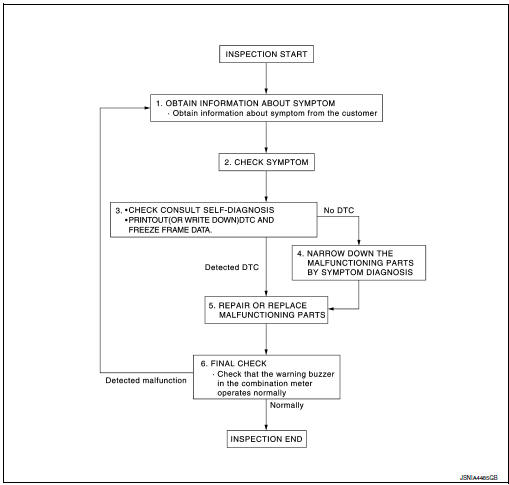
DETAILED FLOW
1.OBTAIN INFORMATION ABOUT SYMPTOM
Interview the customer to obtain as much information as possible about the conditions and environment under which the malfunction occurred.
>> GO TO 2.
2.CHECK SYMPTOM
- Check the symptom based on the information obtained from the customer.
- Check if any other malfunctions are present.
> GO TO 3.
3.CHECK CONSULT SELF-DIAGNOSIS RESULTS
- Connect CONSULT and perform "self-diagnosis". Refer to WCS-27, "DTC Index".
- When DTC is detected, follow the instructions below:
- Record DTC and Freeze Frame Data.
Are self-diagnosis results normal? YES >> GO TO 4.
NO >> GO TO 5.
4.NARROW DOWN MALFUNCTIONING PARTS BY SYMPTOM DIAGNOSIS
Perform symptom diagnosis and narrow down the malfunctioning parts.
>> GO TO 5.
5.REPAIR OR REPLACE MALFUNCTIONING PARTS
Repair or replace malfunctioning parts.
NOTE: If DTC is displayed, erase DTC after repairing or replacing malfunctioning parts.
>> GO TO 6.
6.FINAL CHECK
Check that the warning buzzer in the combination meter operates normally.
Does it operate normally? YES >> Inspection End.
NO >> GO TO 1.
 Wiring diagram
Wiring Diagram
...

Other materials:
Oil cooler
Exploded View
Intake manifold
Cylinder block
Clamp
Water hose
Water hose clip
Water hose
Oil cooler
Gasket
Oil cooler relief valve
Front
Removal and Installation
WARNING:
Be careful not to burn yourself, as engine oil and ...
Front grille
Exploded View
Front bumper fascia
Front camera (if equipped)
Front grille
Front emblem
Pawl
Clip
Removal and Installation
REMOVAL
Remove front grille upper clip (A) (LH/RH).
Release clips and pawls, then remove front grille.
: Clip
: Pawl
Disco ...
Radiator
Exploded View
REMOVAL
Reservoir tank
Reservoir tank cap
Reservoir tank hose
Mounting rubber (upper)
Radiator cap
Radiator
CVT fluid cooler hose
Clamp
CVT fluid cooler hose
Mounting rubber (lower)
O-ring
Drain plug
...
