
Nissan Rogue Service Manual: Basic inspection
DIAGNOSIS AND REPAIR WORKFLOW
Trouble Diagnosis Flow Chart

Trouble Diagnosis Procedure
INTERVIEW WITH CUSTOMER
Interview with the customer is important to detect the root cause of CAN communication system errors and to understand vehicle condition and symptoms for proper trouble diagnosis.
Points in interview
- What: Parts name, system name
- When: Date, Frequency
- Where: Road condition, Place
- In what condition: Driving condition/environment
- Result: Symptom
NOTE:
- Check normal units as well as error symptoms.
- Example: Circuit between ECM and the combination meter is judged normal if the customer indicates tachometer functions normally.
- When a CAN communication system error is present, multiple control units may malfunction or go into failsafe mode.
- Indication of the combination meter is important to detect the root cause because it is the most obvious to the customer, and it performs CAN communication with many units.
INSPECTION OF VEHICLE CONDITION
Check whether the symptom is reproduced or not.
NOTE: Do not turn the ignition switch OFF or disconnect the battery cable while reproducing the error. The error may temporarily correct itself, making it difficult to determine the root cause.
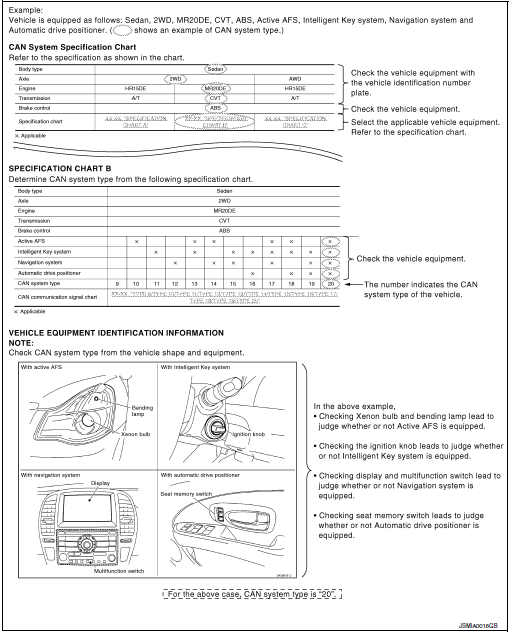
CHECK OF CAN SYSTEM TYPE (HOW TO USE CAN SYSTEM TYPE SPECIFICATION CHART)
Determine CAN system type based on vehicle equipment.
NOTE:
- This chart is used if CONSULT does not automatically recognize CAN system type
- • There are two styles for CAN system type specification charts. Depending on the number of available system types, either style A or style B may be used.
CAN System Type Specification Chart (Style A)
NOTE: CAN system type is easily checked with the vehicle equipment identification information shown in the chart.

CAN System Type Specification Chart (Style B)
NOTE: CAN system type is easily checked with the vehicle equipment identification information shown in the chart.
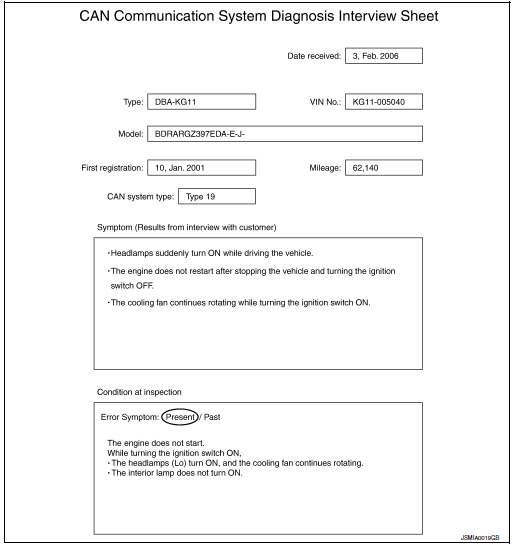
CREATE INTERVIEW SHEET
Fill out the symptom described by the customer, vehicle condition, and CAN system type on the interview sheet.
Interview Sheet (Example)
DETECT THE ROOT CAUSE
CAN diagnosis function of CONSULT detects the root cause.
 System description
CAN COMMUNICATION SYSTEM
System Description
CAN communication is a multiplex communication system. This enables the
system to transmit and receive
large quantities of data at high speed by c ...
 CAN
CAN
...
Other materials:
Precautions on cruise control
Precautions on cruise control
CANCEL switch
ACCEL/RES switch
COAST/SET switch
ON/OFF switch
If the cruise control system malfunctions, it
cancels automatically. The CRUISE indicator
light in the vehicle information display
then blinks to warn the driver. ...
Diagnosis system (IPDM E/R)
CONSULT Function (IPDM E/R)
APPLICATION ITEM
CONSULT performs the following functions via CAN communication with IPDM E/R.
Direct Diagnostic Mode
Description
Ecu Identification
The IPDM E/R part number is displayed.
Self Diagnostic Result
The IPDM E/R sel ...
Periodic maintenance
FRONT SUSPENSION ASSEMBLY
Inspection
COMPONENT
Check the conditions (looseness, backlash) of each component. Verify the
component conditions (wear, damage)
are normal.
Ball Joint Axial End Play
Set front wheels in a straight-ahead position.
Move axle side of transverse link, ...
