
Nissan Rogue Owners Manual: Warning systems switch (if so equipped)
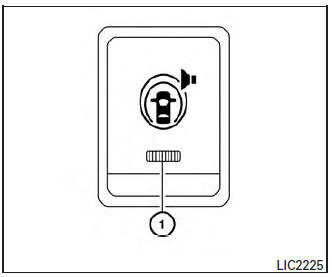
Warning systems switch (if so equipped)
The warning systems switch is used to turn on and off the warning systems (Lane Departure Warning (LDW), Forward Collision Warning (FCW) and Blind SpotWarning (BSW) systems) that are activated using the settings menu on the vehicle information display.
When the warning systems switch is turned off, the indicator 1 on the switch is off. The indicator will also be off if all of the warning systems are deactivated using the settings menu.
The LDW system will sound a warning chime and blink the LDW indicator light (orange) to alert the driver if the vehicle is traveling close to either the left or the right of a traveling lane with detectable lane markers. For additional information, refer to “Lane Departure Warning (LDW) system� in the “Starting and driving� section of this manual.
The BSW system will turn on the BSW indicator light, located next to the outside mirrors, if the camera detects a vehicle in the detection zone. If the turn signal is activated in the direction of the detected vehicle, a chime sounds twice and the BSW indicator light will flash. For additional information, refer to “Blind Spot Warning (BSW) system� in the “Starting and driving� section of this manual.
 Hill descent control switch (if so equipped)
WARNING
Never rely solely on the hill descent
control system to control vehicle speed
when driving on steep downhill grades.
...
 Power outlets
Instrument Panel
12V OUTLETS
The power outlets are for powering electrical
accessories such as cellular telephones. They
are rated at 12 volt, 120W (10A) maximum.
The front and center conso ...
Other materials:
Rear wiper arm
Exploded View
Rear wiper motor
Rear wiper arm
Rear wiper blade
Rear wiper arm cover
Seal
Removal and Installation
REMOVAL
Check that the rear wiper is in the auto stop position.
Remove the rear wiper arm cover.
Remove the rear wiper arm nut from ...
Basic inspection
DIAGNOSIS AND REPAIR WORKFLOW
Work Flow
OVERALL SEQUENCE
DETAILED FLOW
1.GET INFORMATION FOR SYMPTOM
Get detailed information from the customer about the symptom (the condition
and the environment when the
incident/malfunction occurred).
>> GO TO 2.
2.CONFIRM THE SYMPTOM
Try t ...
Front seat
Exploded View
DRIVER POWER SEAT
Headrest
Seatback support
Seatback board
Seatback heater (if equipped)
Seatback trim
Seatback pad
Seat cushion outer finisher (RH)
Seat cushion rear finisher
(RH)
Seat cushion inner finisher (RH)
Seat sli ...
