
Nissan Rogue Owners Manual: Vehicle load capacity
Before driving a loaded vehicle, confirm that you do not exceed the Gross Vehicle Weight Rating (GVWR) or the Gross Axle Weight Rating (GAWR) for your vehicle.
Both the GVWR and GAWR are located on the F.M.V.S.S./C.M.V.S.S. certification label. Refer to “Measurement of weights� in this section.
Do not exceed the load limit of your vehicle shown as “The combined weight of occupants and cargo� on the Tire and Loading Information label. Do not exceed the number of occupants shown as “Seating Capacity� on the Tire and Loading Information label.
To get “the combined weight of occupants and cargo�, add the weight of all occupants, then add the total luggage weight. Examples are shown in the following illustration.
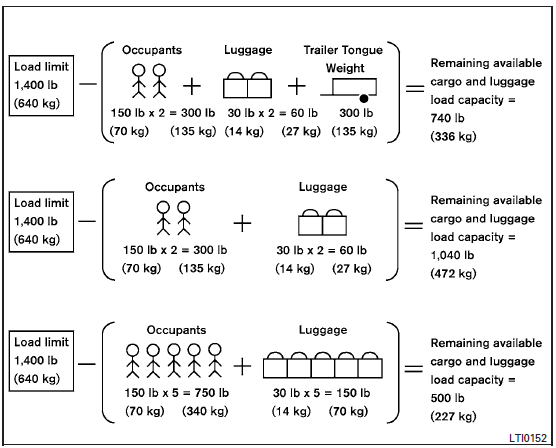
Steps for determining correct load limit
- Locate the statement “The combined weight of occupants and cargo should never exceed XXX lbs or XXX kg� on your vehicle’s placard.
- Determine the combined weight of the driver and passengers that will be riding in your vehicle.
- Subtract the combined weight of the driver and passengers from XXX lbs or XXX kg.
- The resulting figure equals the available amount of cargo and luggage load capacity. For example, if the XXX amount equals 1,400 lbs. and there will be five 150 lb. passengers in your vehicle, the amount of available cargo and luggage load capacity is 650 lbs. (1,400-750 (5 X 150) = 650 lbs) or (640-340 (5 X 70) = 300 kg.)
- Determine the combined weight of luggage and cargo being loaded on the vehicle. That weight may not safely exceed the available cargo and luggage load capacity calculated in Step 4.
- If your vehicle will be towing a trailer, load from your trailer will be transferred to your vehicle. Consult this manual to determine how this reduces the available cargo and luggage load capacity of your vehicle.
Before driving a loaded vehicle, confirm that you do not exceed the Gross Vehicle Weight Rating (GVWR) or the Gross Axle Weight Rating (GAWR) for your vehicle.
For additional information, refer to “Measurement of weights� in this section.
Also check tires for proper inflation pressures.
See the Tire and Loading Information label.
 Terms
Terms
It is important to familiarize yourself with
the following terms before loading your
vehicle:
Curb Weight (actual weight of your
vehicle) - vehicle weight including:
standard and optio ...
 Securing the load
Cargo area luggage hooks
There are luggage hooks located in the cargo
area as shown. The hooks can be used to secure
cargo with ropes or other types of straps.
Do not apply a total load of m ...
Other materials:
Vacuum lines
Exploded View
Clamp
Vacuum hose
Vacuum tube
Clip
Vacuum hose
To intake manifold
To brake booster
Paint mark
Stamp indicating engine direction
Removal and Installation
REMOVAL
Remove the cowl top. Refer to EXT-25, "Removal and Installati ...
If your vehicle overheats
WARNING
Do not continue to drive if your vehicle
overheats. Doing so could cause engine
damage or a vehicle fire.
To avoid the danger of being scalded,
never remove the radiator or coolant
reservoir cap while the engine is still
hot. When the radiator o ...
P2135 TP sensor
DTC Description
DTC DETECTION LOGIC
DTC No.
CONSULT screen terms
(Trouble diagnosis content)
DTC detecting condition
P2135
TP SENSOR-B1
(Throttle/pedal position sensor/switch ″A″ /
″B″ voltage correlation)
Rationally incorrect voltage is ...
