
Nissan Rogue Owners Manual: Vehicle identification
Vehicle identification number (VIN) plate

The vehicle identification number (VIN) plate is located as shown. This number is the identification for your vehicle and is used in the vehicle registration.
The VIN number is also available through the center display screen. For additional information, refer to your “Navigation System Owner’s Manual�.
Vehicle identification number (chassis number)

The vehicle identification number is located as shown.
Engine serial number
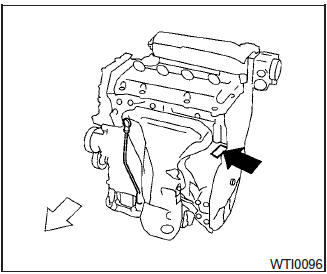
The number is stamped on the engine as shown.
F.M.V.S.S./C.M.V.S.S. certification label

The Federal/Canadian Motor Vehicle Safety Standard (F.M.V.S.S./C.M.V.S.S.) certification label is affixed as shown. This label contains valuable vehicle information, such as: (GVWR), (GAWR), month and year of manufacture, (VIN), etc. Review it carefully.
Emission control information label
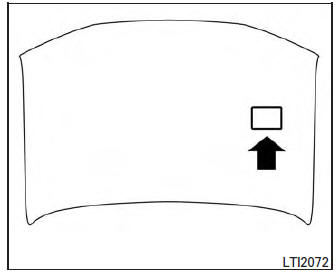
The emission control information label is attached to the underside of the hood as shown.
Tire and loading information label

The cold tire pressure is shown on the Tire and Loading Information label. The label is located as shown.
Air conditioner specification label

The air conditioner specification label is affixed to the underside of the hood as shown.
 When traveling or registering your vehicle in
another country
When traveling or registering your vehicle in
another country
When planning to drive your NISSAN vehicle
in another country, you should first find
out if the fuel available is suitable for your vehicle’s
engine.
Using fuel with an octane rating that is t ...
 Installing front license plate
Installing front license plate
Use the following steps to mount the front license
plate:
Before mounting the license plate, confirm that
the following parts are enclosed in the plastic
bag:
...
Other materials:
NISSAN vehicle immobilizer system
The NISSAN Vehicle Immobilizer system will not
allow the engine to start without the use of the
registered key.
If the engine fails to start using a registered key
(for example, when interference is caused by
another registered key, an automated toll road
device or automatic payment device o ...
Diagnosis and repair work flow
Work Flow
OVERALL SEQUENCE
DETAILED FLOW
1.INTERVIEW THE CUSTOMER FOR THE SYMPTOM
Interview the customer for the symptom (the condition and the environment
when the incident/malfunction
occurs).
>> GO TO 2.
2.CHECK SYMPTOM
Check the symptom from the customer information.
> ...
Vacuum lines
Exploded View
Clamp
Vacuum hose
Vacuum tube
Clip
Vacuum hose
To intake manifold
To brake booster
Paint mark
Stamp indicating engine direction
Removal and Installation
REMOVAL
Remove the cowl top. Refer to EXT-25, "Removal and Installati ...
