
Nissan Rogue Owners Manual: Installing front license plate
Installing front license plate
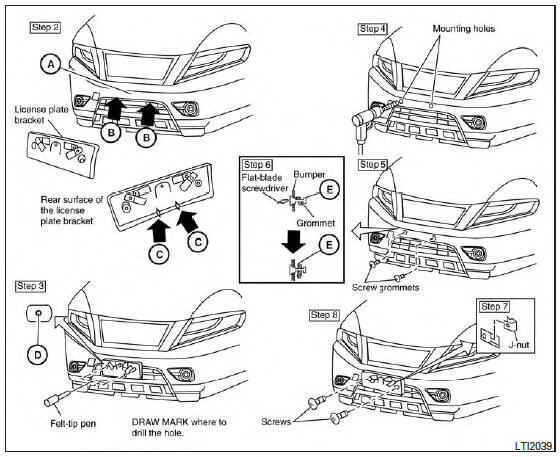
Use the following steps to mount the front license plate:
Before mounting the license plate, confirm that the following parts are enclosed in the plastic bag:
- License plate bracket
- License plate bracket (J-nut) screws x 2
- License plate screws x 2
- Screw grommets x 2
- Park the vehicle on flat, level ground.
- Locate the center position A as illustrated.
Line up the license plate bracket under the top of the front bumper B with the tabs C .
Hold the license plate bracket in place.
- Mark the center of the hole D with a felt-tip pen.
- Carefully drill two pilot holes using a 0.39 in (10 mm) drill bit at the marked locations. (Be sure that the drill only goes through the bumper fascia.)
- Insert the grommets into the holes in the bumper fascia.
- Insert a small flat-bladed screwdriver into the grommet hole to turn the threaded part of the grommet 90° E .
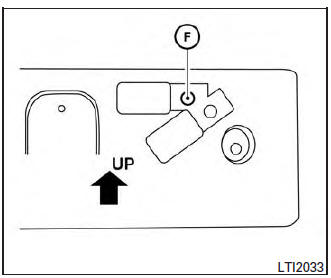
Mark the center of the hole F on both sides with a felt-tip pen. Remove the bracket from the bumper, and then open 0.79 in (20 mm) diameter holes on the bumper using the marks F as a center.
- Insert a J-nut into the license plate bracket before placing the license plate bracket on the fascia.
- Install the license plate bracket with screws.
- Install the license plate with bolts that are no longer than 0.55 in (14 mm).
 Vehicle identification
Vehicle identification number (VIN) plate
The vehicle identification number (VIN) plate is
located as shown. This number is the identification
for your vehicle and is used in the vehicle
regi ...
 Vehicle loading information
WARNING
It is extremely dangerous to ride
in a cargo area inside a vehicle. In
a collision, people riding in these
areas are more likely to be seriously
injured or kil ...
Other materials:
Diagnosis system (TCM)
DIAGNOSIS DESCRIPTION
DIAGNOSIS DESCRIPTION : 1 Trip Detection Diagnosis and 2 Trip Detection
Diagnosis
NOTE:
“Start the engine and turn OFF the ignition switch after warm-up.� This is
defined as 1 trip.
1 TRIP DETECTION DIAGNOSIS
When initial malfunction is detected, TCM memorizes DTC. ...
P0740 torque converter
DTC Description
DTC DETECTION LOGIC
DTC
CONSULT screen terms
(Trouble diagnosis content)
DTC detection condition
P0740
TORQUE CONVERTER
(Torque Converter Clutch Circuit/Open)
When all of the following conditions are satisfied and this state is
maintained
fo ...
Ducts and grilles
Exploded View
Side defroster duct (RH)
Defroster nozzle
Side defroster duct (LH)
Center ventilator duct
Heating and cooling unit assembly
Front foot duct (LH)
Front floor connecting duct (LH)
Front floor duct (LH)
Rear center ventilator duct
Adaptor duct 11 ...
