
Nissan Rogue Service Manual: Unit disassembly and assembly
FRONT COMBINATION LAMP
Exploded View
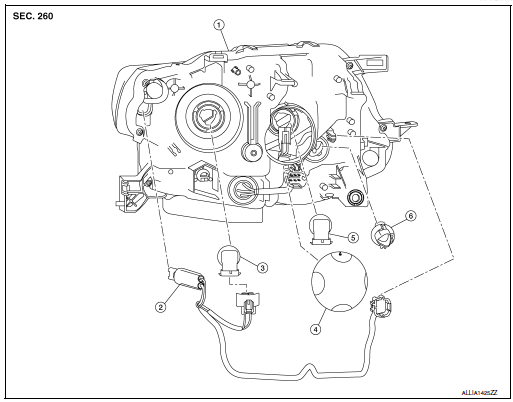
- Front combination lamp
- Parking (side marker) lamp bulb socket
- Headlamp (low beam) bulb
- Plastic cover
- Headlamp (high beam) bulb
- Turn signal lamp bulb socket
Disassembly and Assembly
DISASSEMBLY
- Remove front combination lamp. Refer to EXL-119, "Removal and Installation".
- Rotate the headlamp (low beam) bulb counterclockwise and remove.
- Disconnect the harness connector from headlamp (low beam) bulb.
- Remove plastic cover.
- Rotate the headlamp (high beam) bulb counterclockwise and remove.
- Disconnect the harness connector from headlamp (high beam) bulb.
- Rotate the parking (side marker) lamp bulb socket counterclockwise and remove.
- Remove the parking (side marker) lamp bulb from the bulb socket.
- Rotate the turn signal lamp bulb socket counterclockwise and remove.
- Remove the turn signal lamp bulb from the bulb socket.
ASSEMBLY
Assembly is in the reverse order of disassembly.
REAR COMBINATION LAMP
Exploded View
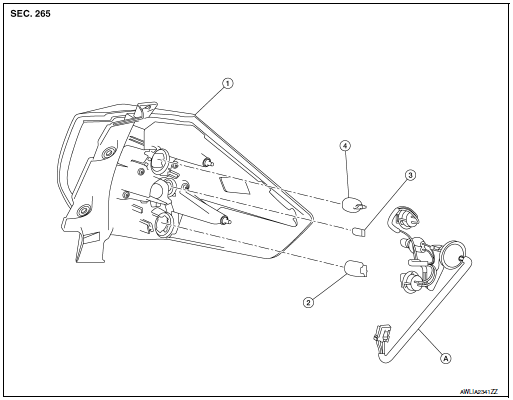
- Rear combination lamp
- Turn signal lamp bulb
- Tail lamp bulb
- Stop lamp bulb
- Rear combination lamp harness
Disassembly and Assembly
DISASSEMBLY
- Remove rear combination lamp. Refer to EXL-127, "Removal and Installation".
- Rotate the stop lamp bulb socket counterclockwise and remove.
- Remove the stop lamp bulb from the bulb socket.
- Rotate the tail lamp bulb socket counterclockwise and remove.
- Remove the tail lamp bulb from the bulb socket.
- Rotate the turn signal lamp bulb socket counterclockwise and remove.
- Remove the turn signal lamp bulb from bulb socket.
ASSEMBLY
Assembly is in the reverse order of disassembly.
CAUTION: After installing, be sure to install the bulb sockets securely to ensure watertightness.
 Removal and installation
FRONT COMBINATION LAMP
Exploded View
Front fender
Front combination lamp
Clip
Removal and Installation
REMOVAL
Remove front bumper fascia. Refer to EXT-17, "Removal an ...
 Service data and specifications (SDS)
Bulb Specifications
*: Always check with the Parts Department for the latest parts info. ...
Other materials:
Symptom diagnosis
SQUEAK AND RATTLE TROUBLE DIAGNOSES
Work Flow
CUSTOMER INTERVIEW
Interview the customer if possible, to determine the conditions that exist
when the noise occurs. Use the Diagnostic
Worksheet during the interview to document the facts and conditions when the
noise occurs and any
custome ...
Blind Spot Warning (BSW) System / Lane
Departure Warning (LDW) System (if so equipped)
The Blind Spot Warning (BSW) system helps
alert the driver of other vehicles in adjacent lanes
when changing lanes.
The Lane Departure Warning (LDW) system
helps alert the driver when the vehicle is traveling
close to either the left or the right of a traveling
lane.
The BSW/LDW systems ...
Battery
How to Handle Battery
CAUTION:
If it becomes necessary to start the engine with a booster
battery and jumper cables, use a 12-volt
booster battery.
After connecting battery cables, ensure that they are tightly
clamped to battery terminals for good
contact.
Never ...
