
Nissan Rogue Owners Manual: Instrument panel
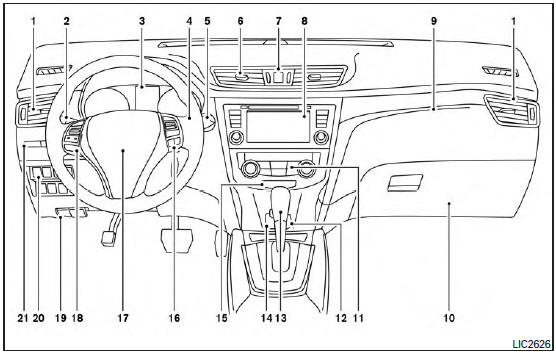
- Vent
- Headlight/fog light (if so equipped)/turn signal switch
- Meters, gauges, warning/indicator lights and Vehicle Information Display
- Windshield wiper/washer switch and rear window wiper/washer switch /Ignition switch (if so equipped)
- Push-button ignition switch (if so equipped)
- Vent
- Hazard warning flasher switch
- Radio /Navigation system* (if so equipped)
- Front passenger supplemental air bag
- Glove box
- Heater and air conditioning controls
- Power outlet
- Shift lever
- Auxiliary jack /USB port
- Front passenger air bag status light
- Cruise control main/set switches (/Bluetooth Hands-Free Phone System (if so equipped)
- Driver supplemental air bag/Horn (, )
- Control panel and Vehicle Information Display switches
- Hood release /Fuel door release
- Vehicle Dynamic Control (VDC) OFF switch Sport mode switch ECO mode switch (if so equipped) Power liftgate switch (if so equipped) (P.3-28) Power liftgate main switch (if so equipped) Warning systems switch (if so equipped) All-Wheel Drive (AWD) lock switch (if so equipped) Hill descent control switch (if so equipped)
- Instrument brightness control /Twin trip odometer reset switch
*: Refer to the separate Navigation System Owner’s Manual (if so equipped).
Refer to the page number indicated in parentheses for operating details.
 Passenger compartment
Glove box
Map lights
Console box
Power panoramic moonroof (if so equipped)
Luggage hooks
Center armrest (2nd row)
Seats
Cup holders ...
 Engine compartment check locations
QR25DE engine
Engine coolant reservoir
Engine oil filler cap
Brake fluid reservoir
Battery
Air cleaner
Fuse/Fusible link box
Radiator cap ...
Other materials:
Precautions on child restraints
WARNING
Failure to follow the warnings and instructions
for proper use and installation
of child restraints could result in
serious injury or death of a child or
other passengers in a sudden stop or
collision:
The child restraint must be ...
Preparation
Special Service Tools
The actual shape of the tools may differ from those illustrated here.
Tool number
(TechMate No.)
Tool name
Description
—
(165-GR8-1200KIT-NI)
Multitasking battery and electrical diagnostic
station
Testing batteries, starting and ...
System description
COMPONENT PARTS
Component Parts Location
Right rear wheel area
Instrument panel
Engine compartment
Left side of instrument panel (view
with trim panel removed)
No.
Part
Function
1
Optical sensor
Refer to EXL-10, "Optical Sensor" ...
