
Nissan Rogue Service Manual: Under cover
Exploded View
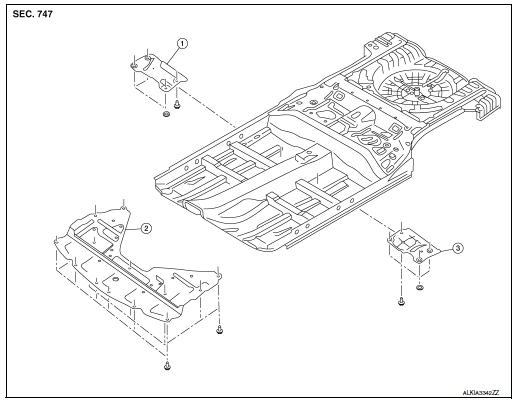
- Floor under cover (RH)
- Engine under cover
- Floor under cover (LH)
ENGINE UNDER COVER
ENGINE UNDER COVER : Removal and Installation
REMOVAL
- Remove engine under cover clips.
- Remove engine under cover.
INSTALLATION
Installation is in the reverse order of removal.
CAUTION: When installing engine under covers, check that clips are securely placed in body panel holes.
FLOOR UNDER COVER
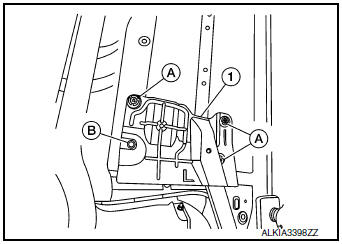
FLOOR UNDER COVER : Removal and Installation
REMOVAL
- Remove floor under cover clip (B) and nuts (A).
- Remove floor under cover (1).
INSTALLATION
Install in the reverse order of removal.
CAUTION: When installing floor under covers, check that clips are securely placed in body panel holes.
 Mudguard
Exploded View
Front mud guard
Rear mud guard
Removal and Installation
FRONT MUD GUARD
Removal
Remove front mud guard screws and remove front mud guard.
Installation
Installati ...
 Roof side molding
Exploded View
Roof side molding
Back door hinge cover
Metal clip
Pawl
Removal and Installation
REMOVAL
Release roof side molding (1) using suitable tool (A) then
remove ...
Other materials:
Recommended fluids and lubricants
Fluids and Lubricants
*1: For additional information, see “Engine Oil Recommendation�.
*2: As an alternative to this recommended oil, SAE 5W-30 conventional petroleum
based oil may be used and meet all specifications
and requirements necessary to maintain the New Vehicle Limited Warra ...
C1143 steering angle sensor
DTC Logic
DTC DETECTION LOGIC
DTC
Display Item
Malfunction detected condition
Possible causes
C1143
ST ANG SEN CIRCUIT
When a malfunction is detected in steering angle sensor.
Harness or connector
Steering angle sensor
ABS actuator and ...
Bluetooth® settings
Bluetooth® settings
To access the phone settings:
Press the [ ] button.
Touch the “Settings� key.
Touch the “Phone & Bluetooth� key.
Menu Item
Result
Phone Settings
For additional information, refer to “Phone settings� in this ...
