
Nissan Rogue Owners Manual: System features
System features
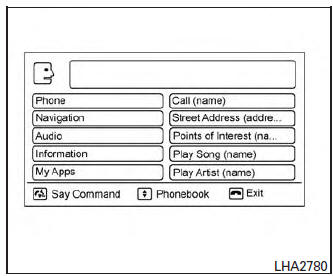
NISSAN Voice Recognition can activate the following systems:
- Bluetoothâ„¢ Hands-Free Phone System
- Navigation
- Audio
- Information
- My Apps
For additional information on the navigation system, refer to the separate Navigation System Owner’s Manual.
How to say numbers
NISSAN Voice Recognition requires a certain way to speak numbers in voice commands. Refer to the following examples.
General rule: Either “zero� or “oh� can be used for “0�.
Phone numbers
Speak phone numbers according to the following example. For 1-800-662-6200, say dial number and then speak the phone number in any of the following formats:
- “one eight oh oh six six two six two oh oh�
- “one eight hundred six six two six two oh oh�
- “one eight zero zero six six two six two oh oh�
For the best voice recognition phone dialing results, say phone numbers as single digits. Also, full numbers can only be spoken for “800�. For example, you cannot say 555-6000 as “five five five six thousand�.
 Using the system
Initialization
When the ignition switch is in the ON position,
NISSAN Voice Recognition is initialized, which
takes a few seconds. When completed, the system
is ready to accept voice commands. If
...
 Bluetooth® Hands-Free Phone System
voice commands
Bluetooth® Hands-Free Phone System
voice commands
To access the Bluetooth® Hands-Free Phone
System voice commands:
Press the button.
Say “Call� and then a name in the vehicle
phonebook to call that entry. Otherwise, say
â ...
Other materials:
The door open warning continues displaying, or does not
display
Description
The door open warning is displayed even though all of the doors are
closed.
The door open warning is not displayed even though a door is ajar.
Diagnosis Procedure
1.CHECK BCM INPUT SIGNAL
Check the BCM input signal. Refer to DLK-149, "Component Function Check&quo ...
Precaution
Precaution for Supplemental Restraint System (SRS) "AIR BAG" and "SEAT
BELT
PRE-TENSIONER"
The Supplemental Restraint System such as “AIR BAG� and “SEAT BELT PRE-TENSIONER�,
used along
with a front seat belt, helps to reduce the risk or severity of injury to the
...
Periodic maintenance
REAR WHEEL HUB AND HOUSING
Inspection
INSPECTION
Make sure the conditions (looseness, back lash) of each component and
component conditions (wear, damage)
are normal.
WHEEL HUB AND BEARING INSPECTION
Move wheel hub and bearing in the axial direction by hand. Make
sure there is no ...
