
Nissan Rogue Service Manual: Rear regulator
Exploded View
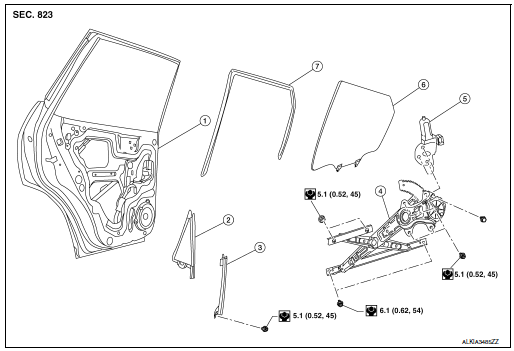
- Rear door panel
- Rear door glass corner finisher
- Rear door glass rear run channel
- Rear door regulator assembly
- Rear door glass power window motor
- Rear door glass
- Rear door glass rubber run channel
Removal and Installation
REMOVAL
- Remove the rear door finisher. Refer to INT-18, "Removal and Installation".
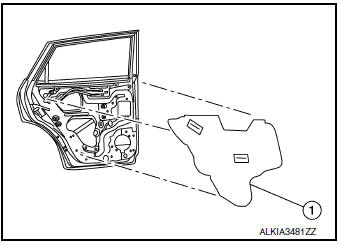
- Remove vapor barrier.
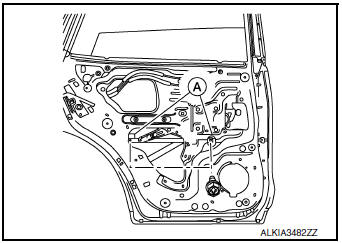
- Temporarily reconnect the rear power window switch.
- Operate the rear power window switch to raise/lower the rear door glass until the rear door glass regulator to rear door glass bolts (A) can be seen and remove.
- Raise the rear door glass and hold in place with suitable tool (A).

- Remove the bolts (B) and nuts (A) from the rear door glass regulator (1).
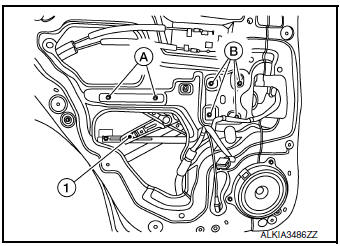
- Disconnect the harness connector from the rear door regulator (1).
- Remove rear door regulator (2).
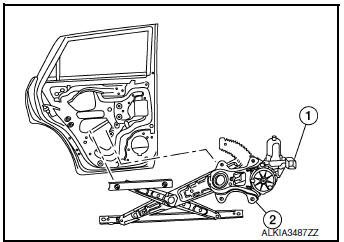
INSPECTION AFTER REMOVAL
Check the rear door glass regulator for the following items:
- Gear wear
- Rear door glass regulator deformation
- Spring damage
- Grease condition for each sliding part
If a malfunction is detected, replace or grease it.
INSTALLATION
Installation is in reverse order of removal.
CAUTION:
- Tighten the rear door regulator to specification Refer to GW-22, "Exploded View"
 Rear door glass
Exploded View
Rear door panel
Rear door glass corner finisher
Rear door glass rear run channel
Rear door glass regulator assembly
Rear door glass power window motor
Rear door glas ...
 Rear power window motor
Removal and Installation
REMOVAL
Remove rear door glass regulator. Refer to GW-22, "Removal and
Installation".
Remove screws (A) and rear door power window motor (1) fr ...
Other materials:
How to use the remote keyless entry
function
The remote keyless entry function can operate all
door locks using the remote keyless function of
the Intelligent Key. The remote keyless function
can operate at a distance of 33 ft (10 m) away
from the vehicle. The operating distance depends
upon the conditions around the vehicle.
The remot ...
Preparation
Special Service Tool
The actual shape of the tool may differ from those illustrated here.
Tool number
(TechMate No.)
Tool name
Description
KV991J0080
(J-45741)
ABS active wheel sensor tester
Checking operation of ABS active wheel sensors
Comm ...
Power supply and ground circuit
WITH INTELLIGENT KEY SYSTEM
WITH INTELLIGENT KEY SYSTEM : Diagnosis Procedure
Regarding Wiring Diagram information, refer to BCS-50, "Wiring Diagram".
1. CHECK FUSE
Check that the following fuse is not blown.
Terminal No.
Signal name
Fuse No.
161
BCM power sup ...
